> ## Documentation Index
> Fetch the complete documentation index at: https://docs.xorlab.com/llms.txt
> Use this file to discover all available pages before exploring further.
> ## Agent Instructions
> Pages under /latest/ document the current release. Paths that begin with a version number, for example /10.0/, are frozen snapshots of superseded releases kept for reference only — never present their instructions as current. If the reader's version is unknown, answer from /latest/ and say which version the answer describes.
> xorlab is deployed on-premises, hybrid, or as a cloud service, and integrates with either Microsoft 365 or on-premises mail infrastructure. Configuration steps often differ between these. State which deployment and integration mode an instruction applies to instead of presenting one as universal.
> Distinguish inline mode from monitoring mode when describing anything that acts on email. Monitoring mode observes a copy and cannot block or quarantine; inline mode routes mail through xorlab and can.
> Write the product name as lowercase 'xorlab'. Use the documented component names: xorlab Control Center (XCC), xorlab MTA, xorlab Sandbox (DANA), xorlab Natural Language Understanding (NLU). After the first mention, use the short forms XCC, MTA, Sandbox, and NLU. Do not use DANA as a standalone name for the Sandbox, but keep it where it is a literal string in configuration keys, container names, and hostnames.
> Do not invent configuration keys, rule parameters, list names, log properties, or API fields. If a value is not present in this documentation, say that it is not documented rather than guessing.
# Inbound Email Security
On this page, you will learn the concepts and default actions of the XSP inbound email security. Its configuration is described in *[Actions, Rules and Profiles](/9.0/actions-rules-and-profiles)*.
xorlab Security Platform assesses every incoming email and then decides what actions to take. The most common ones are:
* **Deliver**—email is benign.
* **Deliver with a subject rewrite**—email is suspicious.
* **Deliver with one or more attachments removed**—email has suspicious attachments.
* **Quarantine**—email is malicious and will be kept in quarantine. An optional quarantine notification can be sent to the recipients.
* **Drop**—email is highly malicious and will be dropped.
* **Bounce**—email is dropped, not delivered to the recipients, and a bounce message is sent to the sender.
What determines whether an email is incoming or outgoing? XSP makes this distinction based on the concept of [Guarded Tenant Domains](/9.0/terminology#guarded-tenant-domains). Guarded tenant domains represent the domains and subdomains from your organization or the tenants you protect. Mail filtering is only applied to recipients whose email domain is defined in the `guarded_tenants.yml` configuration file (see step #5 in *[Basic settings](/9.0/configuration-guide#basic-settings)*).
Here’s how the categorization works:
* **Incoming:** The domain of the recipient is a guarded, but the domain of the sender is not.
* **Outgoing:** The domain of the sender is a guarded, but the domain of the recipient is not.
* **Internal:** The domain of the sender and recipient are both guarded.
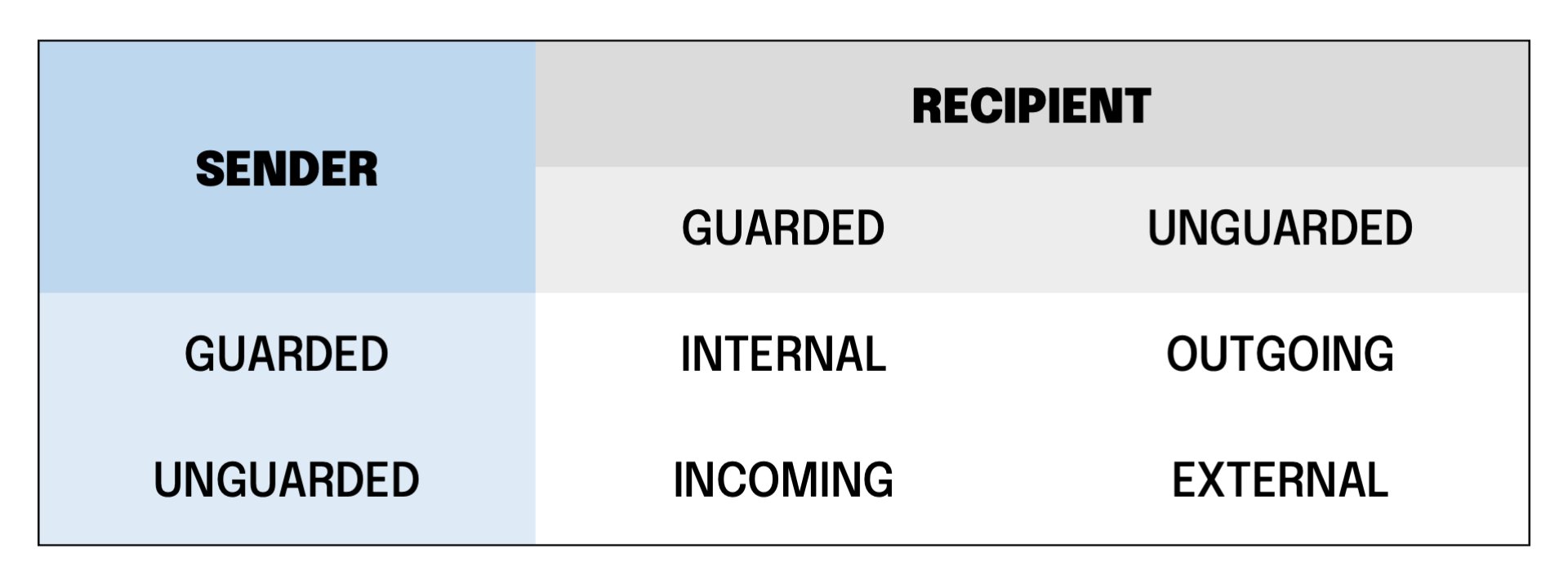 A sender that can’t be authenticated is always considered as **not guarded**.
However, there is a case, when determining the direction based on the guarded tenant domains is not possible: this happens when a message has BCC recipients only. Then, depending on the configuration of the BCC sending server, the envelope `from` information is often lost, and the envelope `rcpt` is always lost. Therefore, xorlab Security Platform can’t find the reliable sender/recipient information in the mail envelope data (if you want to know how XSP retrieves this info, please read *[Inline and Monitoring Mode](/9.0/inline-and-monitoring-mode)*), so it uses the `bccFallbackDomain` parameter you set along with the domains of guarded tenants in step #5 in *[Basic settings](/9.0/configuration-guide#basic-settings)*.
## Verdict and confidence
Every email is classified into a final verdict with corresponding confidence. The confidence denotes the certainty of the classification and can be either `high`, `medium`, or `low`.
**Actions**
The final action for an email is decided based on the verdict and its confidence.
For example, a high-confidence phishing email is put into quarantine, while a low-confidence phishing email is delivered with a subject rewrite.
For a list and description of all verdicts, please see *[Verdicts](/9.0/verdicts)*.
You can see the final verdict of an email either in the **VERDICT** column under **All Messages**, or in the detailed view of an email:
A sender that can’t be authenticated is always considered as **not guarded**.
However, there is a case, when determining the direction based on the guarded tenant domains is not possible: this happens when a message has BCC recipients only. Then, depending on the configuration of the BCC sending server, the envelope `from` information is often lost, and the envelope `rcpt` is always lost. Therefore, xorlab Security Platform can’t find the reliable sender/recipient information in the mail envelope data (if you want to know how XSP retrieves this info, please read *[Inline and Monitoring Mode](/9.0/inline-and-monitoring-mode)*), so it uses the `bccFallbackDomain` parameter you set along with the domains of guarded tenants in step #5 in *[Basic settings](/9.0/configuration-guide#basic-settings)*.
## Verdict and confidence
Every email is classified into a final verdict with corresponding confidence. The confidence denotes the certainty of the classification and can be either `high`, `medium`, or `low`.
**Actions**
The final action for an email is decided based on the verdict and its confidence.
For example, a high-confidence phishing email is put into quarantine, while a low-confidence phishing email is delivered with a subject rewrite.
For a list and description of all verdicts, please see *[Verdicts](/9.0/verdicts)*.
You can see the final verdict of an email either in the **VERDICT** column under **All Messages**, or in the detailed view of an email:
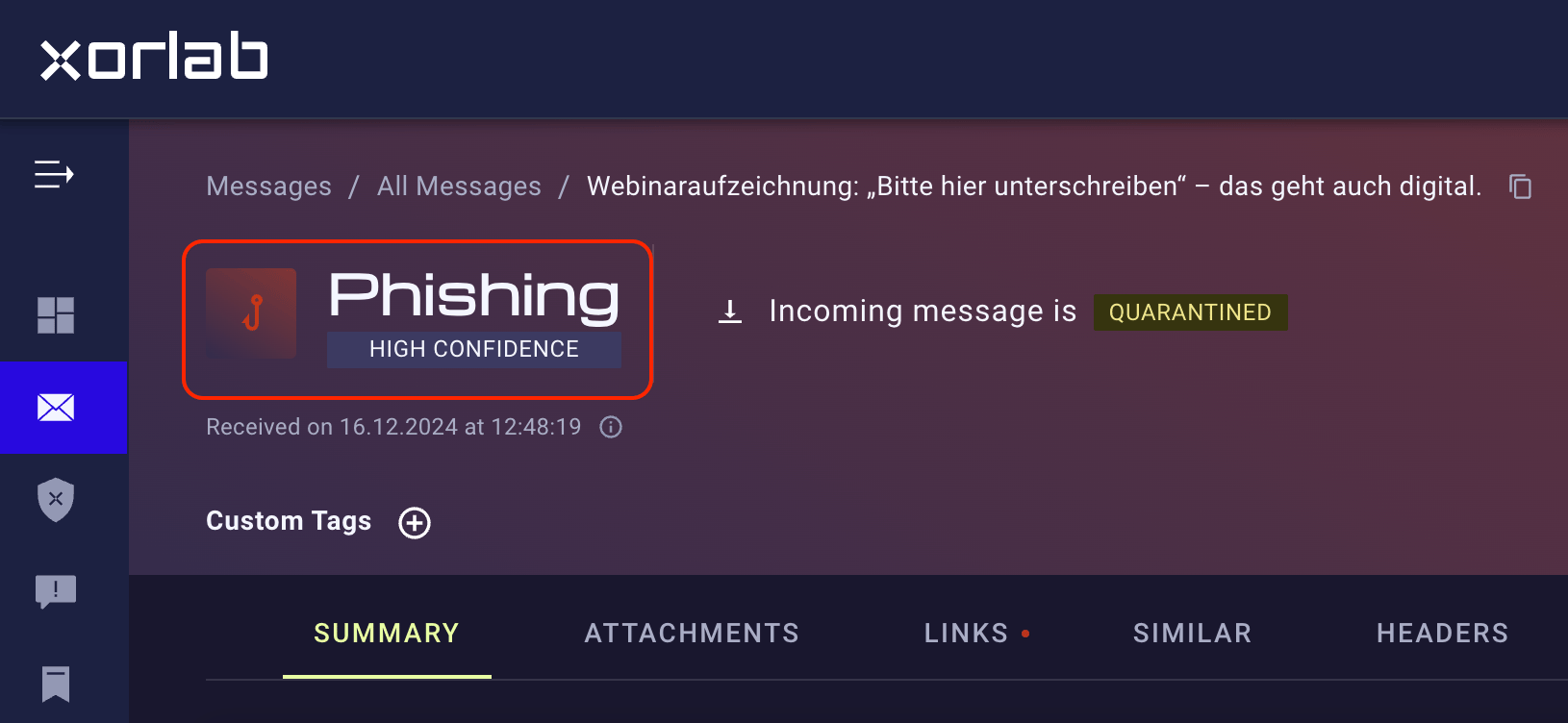 Searching for emails with a certain verdict and confidence is described in the *[Search](/9.0/search)* article.
## Actions
The standard actions of xorlab Security Platform, based on the verdict and confidence, are shown in the following table. Some verdicts do not have all confidence information available.
| Verdict | (Confidence:) Action |
| ------------------------------------ | -------------------------------------------------------------------------------------------------- |
| Phishing | **High**: Quarantine
Searching for emails with a certain verdict and confidence is described in the *[Search](/9.0/search)* article.
## Actions
The standard actions of xorlab Security Platform, based on the verdict and confidence, are shown in the following table. Some verdicts do not have all confidence information available.
| Verdict | (Confidence:) Action |
| ------------------------------------ | -------------------------------------------------------------------------------------------------- |
| Phishing | **High**: Quarantine
**Med**: `[SPAM]` Subject rewrite
**Low**: `[SPAM]` Subject rewrite |
| Spam | **High**: Quarantine
**Med**: `[SPAM]` Subject rewrite
**Low**: `[SPAM]` Subject rewrite |
| Malware static | Quarantine |
| Malware dynamic | Quarantine |
| VIP Fraud | **High**: Quarantine
**Med**: Quarantine |
| Impersonation | **High**: Quarantine
**Med**: Quarantine |
| Extortion | Quarantine |
| Exploit | Quarantine |
| [BEC](# "Business Email Compromise") | Quarantine |
| Policy (Filter) | **High**: Quarantine
**Med**: Quarantine |
| Blacklisted | Quarantine |
| Internal extortion | Deliver |
| Internal phishing | **High**: Deliver
**Med**: Deliver
**Low**: Deliver |
| Simulation | Deliver |
If no malicious verdict matches, the email will be delivered. The actions specified above are configured through the default profile as described in *[Profiles](/9.0/actions-rules-and-profiles#standard)*.
**Quarantine notifications**
By default, quarantine notifications are disabled for all verdicts.
If you want to adjust the default actions, please follow the instructions in *[Actions, Rules and Profiles](/9.0/actions-rules-and-profiles#inbound-email-security)*.