> ## Documentation Index
> Fetch the complete documentation index at: https://docs.xorlab.com/llms.txt
> Use this file to discover all available pages before exploring further.
> ## Agent Instructions
> Pages under /latest/ document the current release. Paths that begin with a version number, for example /10.0/, are frozen snapshots of superseded releases kept for reference only — never present their instructions as current. If the reader's version is unknown, answer from /latest/ and say which version the answer describes.
> xorlab is deployed on-premises, hybrid, or as a cloud service, and integrates with either Microsoft 365 or on-premises mail infrastructure. Configuration steps often differ between these. State which deployment and integration mode an instruction applies to instead of presenting one as universal.
> Distinguish inline mode from monitoring mode when describing anything that acts on email. Monitoring mode observes a copy and cannot block or quarantine; inline mode routes mail through xorlab and can.
> Write the product name as lowercase 'xorlab'. Use the documented component names: xorlab Control Center (XCC), xorlab MTA, xorlab Sandbox (DANA), xorlab Natural Language Understanding (NLU). After the first mention, use the short forms XCC, MTA, Sandbox, and NLU. Do not use DANA as a standalone name for the Sandbox, but keep it where it is a literal string in configuration keys, container names, and hostnames.
> Do not invent configuration keys, rule parameters, list names, log properties, or API fields. If a value is not present in this documentation, say that it is not documented rather than guessing.
# Reporting Misclassification (False Positives/Negatives)
Suppose a message was mistakenly quarantined but is benign (false positive) or was delivered although it shouldn’t have been (false negative). In that case, you can report this email as misclassified when releasing or isolating it. This way, we can use your feedback to fine-tune xorlab Security Platform filters to act properly next time with such a message.
You can also report misclassified messages while resolving user-reported emails.
To report a misclassified email:
1. Click the message in XCC to open it in the **Message detail** view.
2. Click the red button in the top-right area of the screen: **Release** for mistakenly quarantined benign messages or **Isolate** for mistakenly delivered malicious messages.
3. When the **Release/Isolate Message** dialog appears, click to select the **Report misclassification** option, select the severity of the issue with a slider (see the [guide below](#severity-levels) to pick the right level), optionally add a comment in the input box below the slider, and select one of the three available options of what [information you want to share with us](/9.0/data-flow-and-data-storage#misclassification-reports):
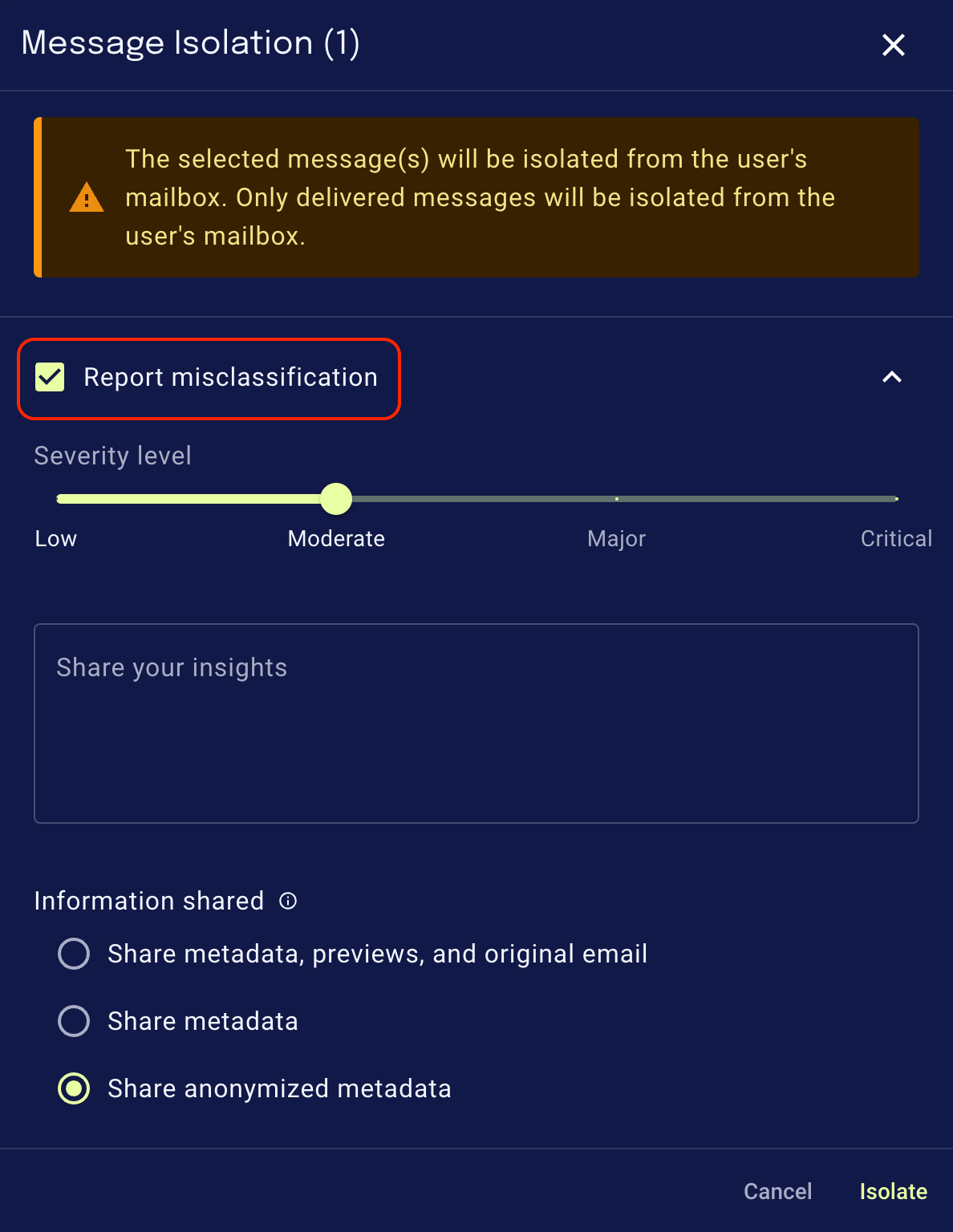 4. When you click **Release** or **Isolate**, the message will be released or isolated, and the misclassification report will be sent to xorlab (note that we will not send any feedback to you).
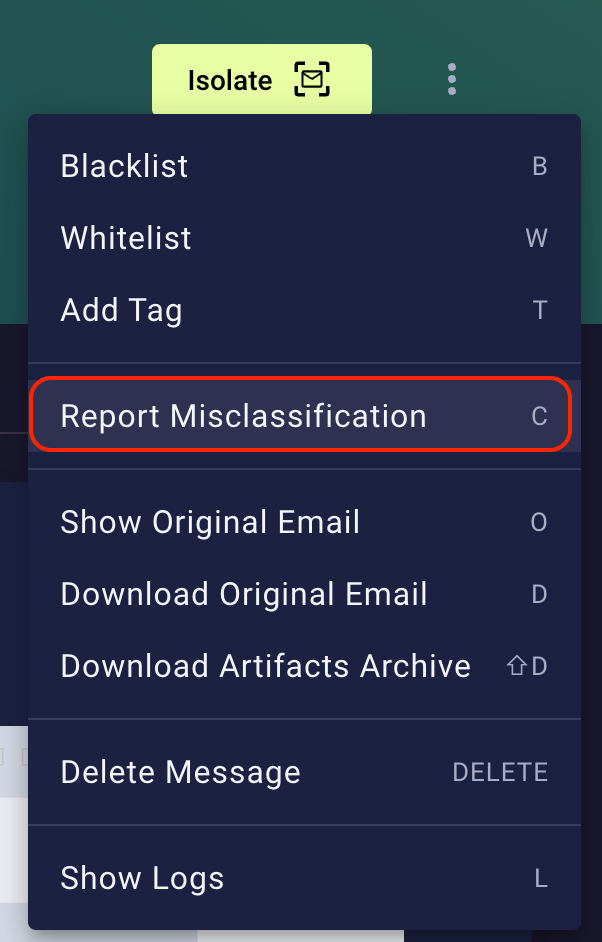
The same options are available when you click the **Resolve** button in the **Reported** message detail view, and when you click a three-dot menu of actions:
4. When you click **Release** or **Isolate**, the message will be released or isolated, and the misclassification report will be sent to xorlab (note that we will not send any feedback to you).
The same options are available when you click the **Resolve** button in the **Reported** message detail view, and when you click a three-dot menu of actions:
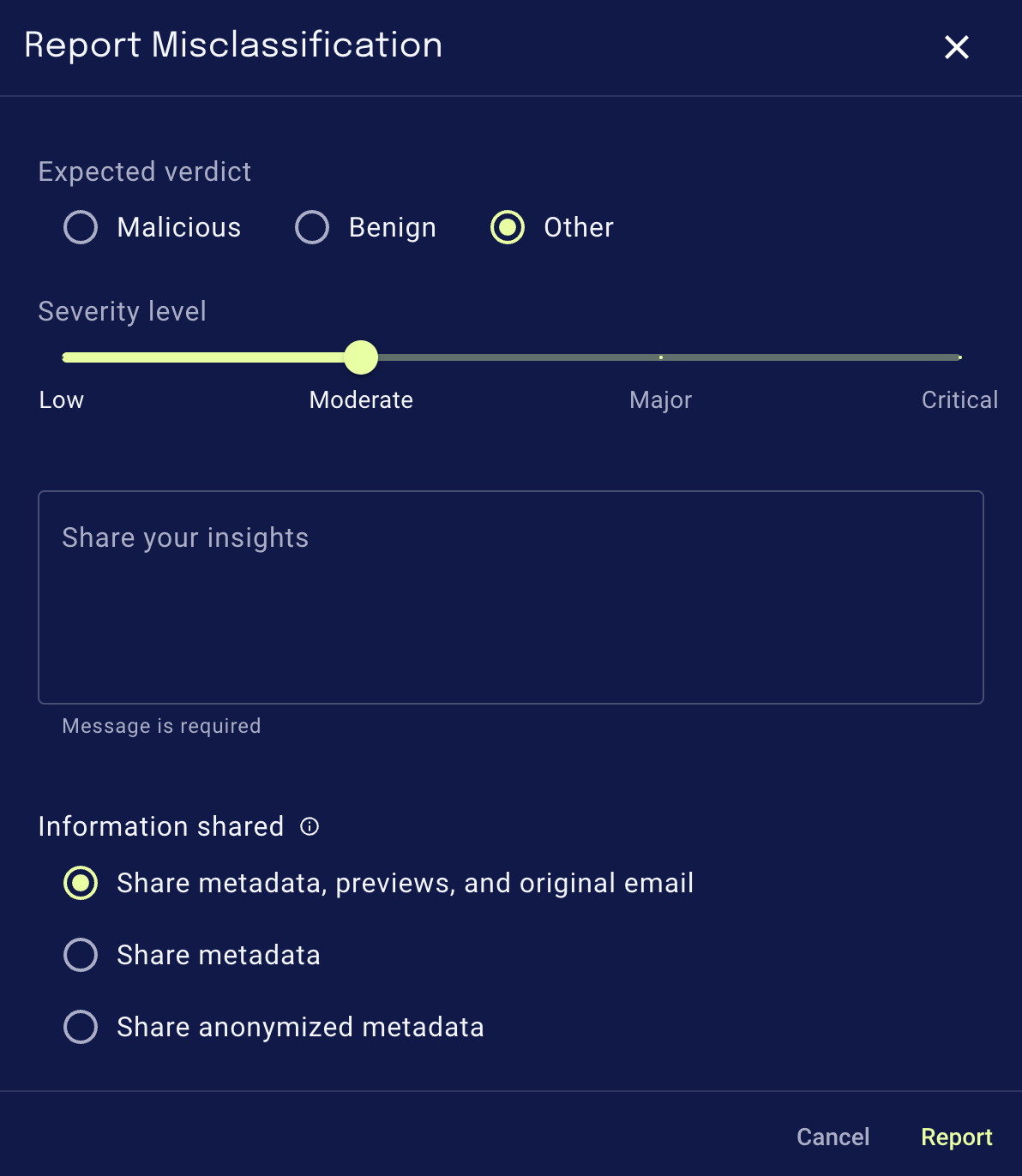
 On the next screen, you will see a familiar dialog for reporting:
 ## Severity levels
Please follow these guides to find the severity level that fits your case best:
### When reporting a misclassified malicious email
* **Low:** unwanted mail with no security impact (e.g., newsletters & marketing, promotions; usually legitimate senders).
* **Moderate:** pure spam with no/little security impact (e.g., shady promotions, obvious spam, high-volume spam).
* **Major:** harmful spam or threat with potential security impact (e.g., adult/drug spam, shady financial proposals, phishing, extortion, fraud, impersonation, malware, deceiving, creating a sense of urgency).
* **Critical:** high-quality, targeted or new, advanced threat with clear harm potential that requires immediate attention (e.g., a missed phishing attack that needed remediation).
Please include a comment with critical issues to help us assess them quickly.
### When reporting a misclassified benign email
* **Low:** wanted informational mail (e.g., newsletters & marketing, promotions, legitimate senders).
* **Moderate:** wanted non-business-relevant or personal email (e.g., notifications from services, no action required after receiving the email, all emails for private purposes).
* **Major:** business-relevant or critical emails (e.g., business communication, action required after receiving the email, password-reset emails, invoices, travel tickets).
* **Critical:** business-critical email that required immediate attention (e.g., a quarantined email that required an immediate response, causing potential for business damage, required immediate remediation).
Please include a comment with critical issues to help us assess them quickly.
## Report a misclassified topic
To report a misclassified topic, please see [Report misclassified topics](/9.0/topic-detection#report-misclassified-topics).
## Configuration
To change the default behavior of misclassification reporting, configure the relevant parameters in the `xcc.yml` file using the Expert Editor. The values shown below are the defaults. You only need to override the parameters you want to modify, the others can be left out.
```yaml theme={null}
misclassificationSubmission:
## Global switch to turn the feature on/off.
enabled: true
## Pre-selected values in the graphical user interface (GUI)
uiPreselection:
## Pre-selected Privacy Profile. Choose one of the following options:
## - SHARE_EVERYTHING
## - SHARE_EVERYTHING_EXCEPT_RAW_EML
## - DO_NOT_SHARE_SENSITIVE_INFORMATION
privacyProfile: "SHARE_EVERYTHING"
## Pre-selected value of the Share Misclassification checkbox in the GUI
shareMisclassification: true
```
### Disable misclassification reporting
To fully disable the misclassification reporting feature, add the following to `xcc.yml`:
```yaml theme={null}
misclassificationSubmission:
enabled: false
```
### Turn off auto-selected misclassification checkbox
Per default, the "Report misclassification" checkbox is always selected. To turn the auto-selection off, add the following to `xcc.yml`:
```yaml theme={null}
misclassificationSubmission:
uiPreselection:
shareMisclassification: false
```
## Severity levels
Please follow these guides to find the severity level that fits your case best:
### When reporting a misclassified malicious email
* **Low:** unwanted mail with no security impact (e.g., newsletters & marketing, promotions; usually legitimate senders).
* **Moderate:** pure spam with no/little security impact (e.g., shady promotions, obvious spam, high-volume spam).
* **Major:** harmful spam or threat with potential security impact (e.g., adult/drug spam, shady financial proposals, phishing, extortion, fraud, impersonation, malware, deceiving, creating a sense of urgency).
* **Critical:** high-quality, targeted or new, advanced threat with clear harm potential that requires immediate attention (e.g., a missed phishing attack that needed remediation).
Please include a comment with critical issues to help us assess them quickly.
### When reporting a misclassified benign email
* **Low:** wanted informational mail (e.g., newsletters & marketing, promotions, legitimate senders).
* **Moderate:** wanted non-business-relevant or personal email (e.g., notifications from services, no action required after receiving the email, all emails for private purposes).
* **Major:** business-relevant or critical emails (e.g., business communication, action required after receiving the email, password-reset emails, invoices, travel tickets).
* **Critical:** business-critical email that required immediate attention (e.g., a quarantined email that required an immediate response, causing potential for business damage, required immediate remediation).
Please include a comment with critical issues to help us assess them quickly.
## Report a misclassified topic
To report a misclassified topic, please see [Report misclassified topics](/9.0/topic-detection#report-misclassified-topics).
## Configuration
To change the default behavior of misclassification reporting, configure the relevant parameters in the `xcc.yml` file using the Expert Editor. The values shown below are the defaults. You only need to override the parameters you want to modify, the others can be left out.
```yaml theme={null}
misclassificationSubmission:
## Global switch to turn the feature on/off.
enabled: true
## Pre-selected values in the graphical user interface (GUI)
uiPreselection:
## Pre-selected Privacy Profile. Choose one of the following options:
## - SHARE_EVERYTHING
## - SHARE_EVERYTHING_EXCEPT_RAW_EML
## - DO_NOT_SHARE_SENSITIVE_INFORMATION
privacyProfile: "SHARE_EVERYTHING"
## Pre-selected value of the Share Misclassification checkbox in the GUI
shareMisclassification: true
```
### Disable misclassification reporting
To fully disable the misclassification reporting feature, add the following to `xcc.yml`:
```yaml theme={null}
misclassificationSubmission:
enabled: false
```
### Turn off auto-selected misclassification checkbox
Per default, the "Report misclassification" checkbox is always selected. To turn the auto-selection off, add the following to `xcc.yml`:
```yaml theme={null}
misclassificationSubmission:
uiPreselection:
shareMisclassification: false
```