> ## Documentation Index
> Fetch the complete documentation index at: https://docs.xorlab.com/llms.txt
> Use this file to discover all available pages before exploring further.
> ## Agent Instructions
> Pages under /latest/ document the current release. Paths that begin with a version number, for example /10.0/, are frozen snapshots of superseded releases kept for reference only — never present their instructions as current. If the reader's version is unknown, answer from /latest/ and say which version the answer describes.
> xorlab is deployed on-premises, hybrid, or as a cloud service, and integrates with either Microsoft 365 or on-premises mail infrastructure. Configuration steps often differ between these. State which deployment and integration mode an instruction applies to instead of presenting one as universal.
> Distinguish inline mode from monitoring mode when describing anything that acts on email. Monitoring mode observes a copy and cannot block or quarantine; inline mode routes mail through xorlab and can.
> Write the product name as lowercase 'xorlab'. Use the documented component names: xorlab Control Center (XCC), xorlab MTA, xorlab Sandbox (DANA), xorlab Natural Language Understanding (NLU). After the first mention, use the short forms XCC, MTA, Sandbox, and NLU. Do not use DANA as a standalone name for the Sandbox, but keep it where it is a literal string in configuration keys, container names, and hostnames.
> Do not invent configuration keys, rule parameters, list names, log properties, or API fields. If a value is not present in this documentation, say that it is not documented rather than guessing.
# Topic Detection
xorlab Security Platform (XSP) leverages Natural Language Understanding (NLU) to analyze email content and identify specific topics within the subject, body, and attachments. By recognizing key themes in messages, XSP enhances automated threat detection, helping to identify phishing attempts, fraud, and other malicious activities more effectively.
The set of detectable topics will continue to expand over time as xorlab refines its models and introduces new capabilities.
The following topics are currently detected by xorlab NLU:
| Topic | Description |
| ----------------- | ----------------------------------------------------------------------------------------------------------------------------- |
| `accountissue` | Identifies text related to user account issues, such as password resets, password expirations, and account (de-)activations. |
| `sexualcontent` | Detects sexual content, including explicit language, pornographic material, and marketing of adult products such as Viagra. |
| `invoice` | Recognizes content related to invoices, receipts, and billing documents, helping detect fraudulent or impersonated requests. |
| `packagedelivery` | Identifies text related to package deliveries, including shipping confirmations, customs notifications, and tracking updates. |
## Searching for topics
You can filter and search for emails based on detected topics using the topic attributes, as described in the [Search Documentation](/9.0/search).
## How it Helps
xorlab NLU enhances automated detection and threat analysis by providing additional context for security decisions. By understanding the meaning and intent behind email content, XSP can:
* **Increase detection accuracy:** Helps distinguish between legitimate and suspicious emails by considering their topics in combination with other security signals.
* **Improve prioritization:** Automatically assigns higher risk scores to emails that match attack patterns, such as fraudulent invoices or fake account recovery requests.
* **Reduce manual effort:** Security teams don’t need to manually inspect emails for suspicious patterns—the platform detects and flags threats automatically.
* **Enhance correlation with other indicators:** Works alongside behavioral analysis and sender reputation checks to improve decision-making without analyst intervention.
## Report misclassified topics
If you come across a misclassified topic, please report it — your feedback helps us continuously improve our product and its accuracy.
To report a misclassified topic, follow these steps:
1. Enter the Message detail view of the email with the misclassified topic.
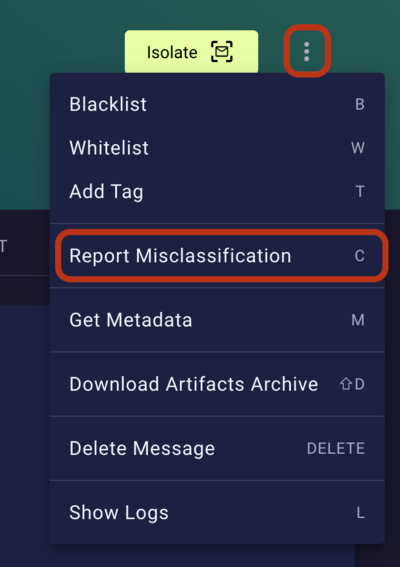
2. Click the three-dot menu at the top right, then `Report Misclassification` (also see [Reporting Misclassification (False Positives/Negatives)](/9.0/reporting-misclassification#reporting-misclassification-false-positivesnegatives)).
 3. Keep the following default settings:
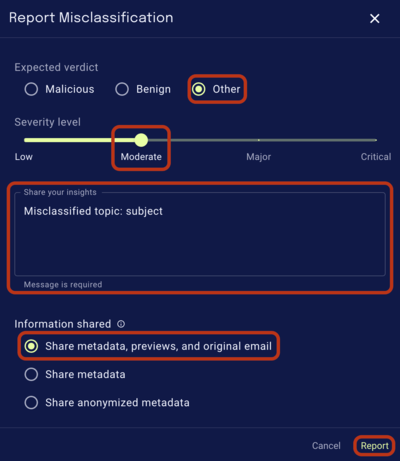
* `Expected verdict` as `Other`.
* `Severity level` as `Moderate`.
* `Information shared` as `Share metadata, previews, and original email`.
4. Add a comment mentioning that it's a misclassified topic, and where the misclassified text is found. E.g. `Misclassified topic: subject`.
5. Click report.
3. Keep the following default settings:
* `Expected verdict` as `Other`.
* `Severity level` as `Moderate`.
* `Information shared` as `Share metadata, previews, and original email`.
4. Add a comment mentioning that it's a misclassified topic, and where the misclassified text is found. E.g. `Misclassified topic: subject`.
5. Click report.