> ## Documentation Index
> Fetch the complete documentation index at: https://docs.xorlab.com/llms.txt
> Use this file to discover all available pages before exploring further.
> ## Agent Instructions
> Pages under /latest/ document the current release. Paths that begin with a version number, for example /10.0/, are frozen snapshots of superseded releases kept for reference only — never present their instructions as current. If the reader's version is unknown, answer from /latest/ and say which version the answer describes.
> xorlab is deployed on-premises, hybrid, or as a cloud service, and integrates with either Microsoft 365 or on-premises mail infrastructure. Configuration steps often differ between these. State which deployment and integration mode an instruction applies to instead of presenting one as universal.
> Distinguish inline mode from monitoring mode when describing anything that acts on email. Monitoring mode observes a copy and cannot block or quarantine; inline mode routes mail through xorlab and can.
> Write the product name as lowercase 'xorlab'. Use the documented component names: xorlab Control Center (XCC), xorlab MTA, xorlab Sandbox (DANA), xorlab Natural Language Understanding (NLU). After the first mention, use the short forms XCC, MTA, Sandbox, and NLU. Do not use DANA as a standalone name for the Sandbox, but keep it where it is a literal string in configuration keys, container names, and hostnames.
> Do not invent configuration keys, rule parameters, list names, log properties, or API fields. If a value is not present in this documentation, say that it is not documented rather than guessing.
# List API
> Automate list entries with the List API: getLists, listEntries, addEntries, and deleteEntries, with API key authentication and tenant scopes.
The List API lets you programmatically add, update, and remove entries on all lists that are visible in the web interface, including custom lists. The following endpoints are supported:
* `getLists`
* `listEntries`
* `addEntries`
* `deleteEntries`
For playbook patterns that use these endpoints — and for getting xorlab events into your SOAR in the first place — see [Automate with a SOAR](/latest/integrations-soar).
## Quickstart
1. Go to the Admin view in xorlab, and open the **API keys** configuration.
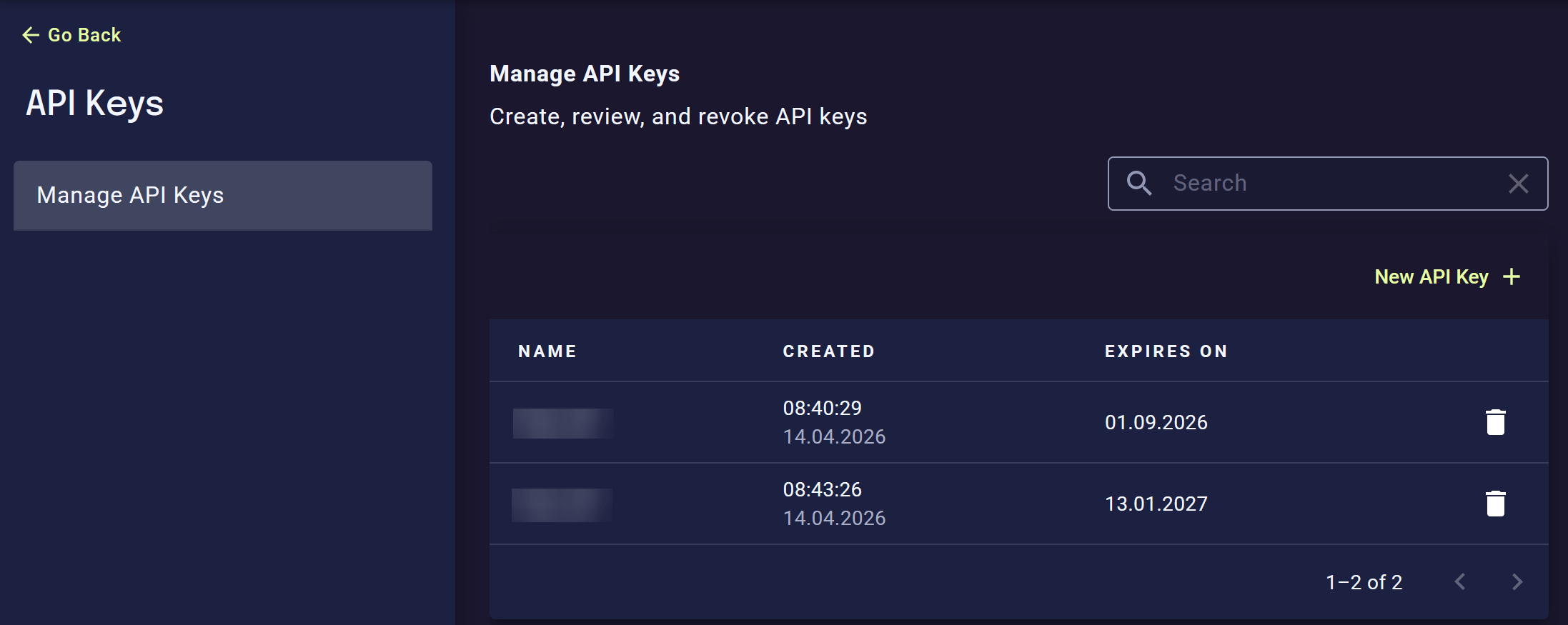 2. Create a new API key and store it in a secure location. The key comes with a fixed permission set that only allows manipulating list entries, and nothing else.
3. Now you can use the key to change lists via the API. Below are some examples.
Use this first to discover which lists are available. For the global scope, set `tenantUid` to `null`:
```bash theme={null}
curl -sS -X POST \
'/api/public/lists/v1/getLists' \
-H 'Authorization: apikey ' \
-H 'Content-Type: application/json' \
-d '{
"tenantUid": null
}'
```
Use this to get the available lists for a specific tenant:
```bash theme={null}
curl -sS -X POST \
'/api/public/lists/v1/getLists' \
-H 'Authorization: apikey ' \
-H 'Content-Type: application/json' \
-d '{
"tenantUid": ""
}'
```
This returns all entries of one list as NDJSON, that is, one JSON object per line.
```bash theme={null}
curl -sS -X POST \
'/api/public/lists/v1/listEntries' \
-H 'Authorization: apikey ' \
-H 'Content-Type: application/json' \
-d '{
"tenantUid": null,
"listName": "BLACKLIST_local_sender_addresses"
}'
```
Use this to add new entries or update existing ones. Existing entries are updated and counted as modifications.
```bash theme={null}
curl -sS -X POST \
'/api/public/lists/v1/addEntries' \
-H 'Authorization: apikey ' \
-H 'Content-Type: application/json' \
-d '{
"tenantUid": null,
"listName": "BLACKLIST_local_sender_addresses",
"entries": [
{
"entry": "bad-domain.example",
"comment": "Added by automation after incident review"
},
{
"entry": "another-bad-domain.example",
"comment": "Confirmed phishing sender domain"
}
]
}'
```
Use this to remove entries that are no longer needed. Missing entries are ignored.
```bash theme={null}
curl -sS -X POST \
'/api/public/lists/v1/deleteEntries' \
-H 'Authorization: apikey ' \
-H 'Content-Type: application/json' \
-d '{
"tenantUid": null,
"listName": "BLACKLIST_local_sender_addresses",
"entries": [
"bad-domain.example",
"another-bad-domain.example"
]
}'
```
Used placeholders:
| Placeholder | Description |
| :------------- | :--------------------------------------------------------------------------------------------------------------------------------------------------------------- |
| `` | Base URL of your xorlab instance, for example `https://xyz.activeguard.cloud`. |
| `` | API key created in the XCC web interface. |
| `` | Use `null` for the global scope. If you want to access a tenant-scoped list, set it to the `uid` parameter of that tenant as found in the `guarded_tenants.yml`. |
| `` | Internal list name, for example `BLACKLIST_local_sender_addresses`. |
## Understanding list behavior
Each list has a maximum size. The exact limit depends on the list type and is returned by the `getLists` endpoint as `maxSize`.
The most important behavior to understand is what happens when a list is already full:
**Automatic cleanup of full lists**
If a list has reached its maximum size and you add a new entry, xorlab automatically removes the oldest existing entry from that list.
This means:
* New entries can still always be added
* The list size never grows beyond its configured maximum
* Older entries may disappear automatically if the list is already full
If needed, you can still manage list entries manually either through the **Lists** page or through configuration files in the Expert Editor. However the same automatic cleanup applies.
## Accessing custom lists
Custom lists can be accessed via the API in the same way as all built-in lists. The only requirement is:
* Custom lists needs to have a corresponding `.info.json` file in the Expert Editor, as described in [Adding a custom list](/latest/adding-custom-rule#adding-a-custom-list).
## Support for multi-tenancy
API keys can be created on:
* the global scope (**All** tenant selected)
* a tenant scope (specific tenant selected)
The scope where a key is created determines what it can access.
* A tenant-scoped key can manipulate list entries only within that tenant
* A globally scoped key can manipulate list entries for all tenants and for the global scope of the instance
2. Create a new API key and store it in a secure location. The key comes with a fixed permission set that only allows manipulating list entries, and nothing else.
3. Now you can use the key to change lists via the API. Below are some examples.
Use this first to discover which lists are available. For the global scope, set `tenantUid` to `null`:
```bash theme={null}
curl -sS -X POST \
'/api/public/lists/v1/getLists' \
-H 'Authorization: apikey ' \
-H 'Content-Type: application/json' \
-d '{
"tenantUid": null
}'
```
Use this to get the available lists for a specific tenant:
```bash theme={null}
curl -sS -X POST \
'/api/public/lists/v1/getLists' \
-H 'Authorization: apikey ' \
-H 'Content-Type: application/json' \
-d '{
"tenantUid": ""
}'
```
This returns all entries of one list as NDJSON, that is, one JSON object per line.
```bash theme={null}
curl -sS -X POST \
'/api/public/lists/v1/listEntries' \
-H 'Authorization: apikey ' \
-H 'Content-Type: application/json' \
-d '{
"tenantUid": null,
"listName": "BLACKLIST_local_sender_addresses"
}'
```
Use this to add new entries or update existing ones. Existing entries are updated and counted as modifications.
```bash theme={null}
curl -sS -X POST \
'/api/public/lists/v1/addEntries' \
-H 'Authorization: apikey ' \
-H 'Content-Type: application/json' \
-d '{
"tenantUid": null,
"listName": "BLACKLIST_local_sender_addresses",
"entries": [
{
"entry": "bad-domain.example",
"comment": "Added by automation after incident review"
},
{
"entry": "another-bad-domain.example",
"comment": "Confirmed phishing sender domain"
}
]
}'
```
Use this to remove entries that are no longer needed. Missing entries are ignored.
```bash theme={null}
curl -sS -X POST \
'/api/public/lists/v1/deleteEntries' \
-H 'Authorization: apikey ' \
-H 'Content-Type: application/json' \
-d '{
"tenantUid": null,
"listName": "BLACKLIST_local_sender_addresses",
"entries": [
"bad-domain.example",
"another-bad-domain.example"
]
}'
```
Used placeholders:
| Placeholder | Description |
| :------------- | :--------------------------------------------------------------------------------------------------------------------------------------------------------------- |
| `` | Base URL of your xorlab instance, for example `https://xyz.activeguard.cloud`. |
| `` | API key created in the XCC web interface. |
| `` | Use `null` for the global scope. If you want to access a tenant-scoped list, set it to the `uid` parameter of that tenant as found in the `guarded_tenants.yml`. |
| `` | Internal list name, for example `BLACKLIST_local_sender_addresses`. |
## Understanding list behavior
Each list has a maximum size. The exact limit depends on the list type and is returned by the `getLists` endpoint as `maxSize`.
The most important behavior to understand is what happens when a list is already full:
**Automatic cleanup of full lists**
If a list has reached its maximum size and you add a new entry, xorlab automatically removes the oldest existing entry from that list.
This means:
* New entries can still always be added
* The list size never grows beyond its configured maximum
* Older entries may disappear automatically if the list is already full
If needed, you can still manage list entries manually either through the **Lists** page or through configuration files in the Expert Editor. However the same automatic cleanup applies.
## Accessing custom lists
Custom lists can be accessed via the API in the same way as all built-in lists. The only requirement is:
* Custom lists needs to have a corresponding `.info.json` file in the Expert Editor, as described in [Adding a custom list](/latest/adding-custom-rule#adding-a-custom-list).
## Support for multi-tenancy
API keys can be created on:
* the global scope (**All** tenant selected)
* a tenant scope (specific tenant selected)
The scope where a key is created determines what it can access.
* A tenant-scoped key can manipulate list entries only within that tenant
* A globally scoped key can manipulate list entries for all tenants and for the global scope of the instance
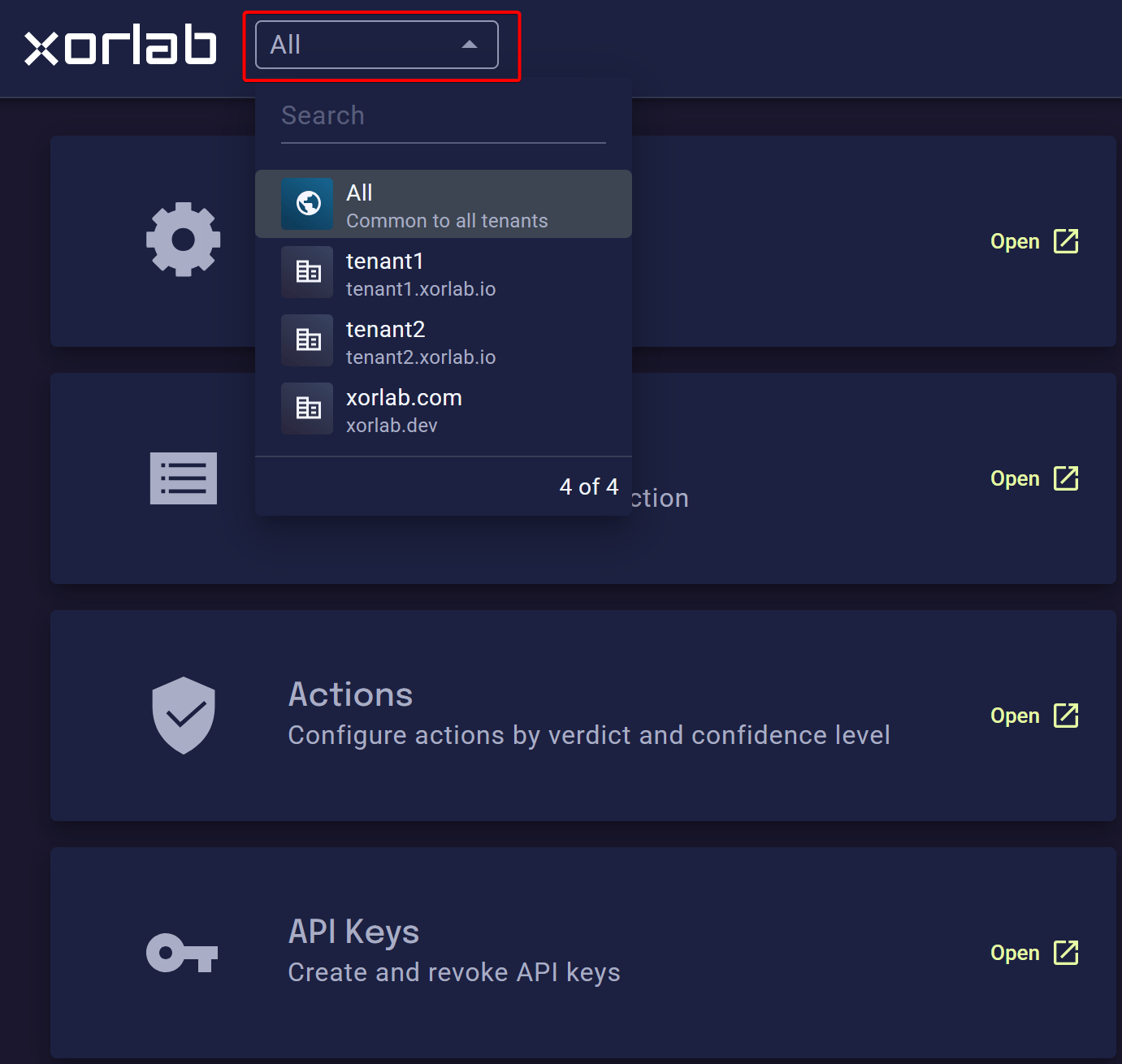 The scope cannot be changed afterward, so create a separate key per automation with the narrowest scope that works. Together with the fixed permission set, this keeps the impact of a leaked key limited to the list entries of one tenant.
## Endpoint reference
Each endpoint has its own reference page in the sidebar below this one, generated
from the OpenAPI specification: request and response schemas, error codes, and a
playground you can call your own instance from.
The scope cannot be changed afterward, so create a separate key per automation with the narrowest scope that works. Together with the fixed permission set, this keeps the impact of a leaked key limited to the list entries of one tenant.
## Endpoint reference
Each endpoint has its own reference page in the sidebar below this one, generated
from the OpenAPI specification: request and response schemas, error codes, and a
playground you can call your own instance from.