> ## Documentation Index
> Fetch the complete documentation index at: https://docs.xorlab.com/llms.txt
> Use this file to discover all available pages before exploring further.
> ## Agent Instructions
> Pages under /latest/ document the current release. Paths that begin with a version number, for example /10.0/, are frozen snapshots of superseded releases kept for reference only — never present their instructions as current. If the reader's version is unknown, answer from /latest/ and say which version the answer describes.
> xorlab is deployed on-premises, hybrid, or as a cloud service, and integrates with either Microsoft 365 or on-premises mail infrastructure. Configuration steps often differ between these. State which deployment and integration mode an instruction applies to instead of presenting one as universal.
> Distinguish inline mode from monitoring mode when describing anything that acts on email. Monitoring mode observes a copy and cannot block or quarantine; inline mode routes mail through xorlab and can.
> Write the product name as lowercase 'xorlab'. Use the documented component names: xorlab Control Center (XCC), xorlab MTA, xorlab Sandbox (DANA), xorlab Natural Language Understanding (NLU). After the first mention, use the short forms XCC, MTA, Sandbox, and NLU. Do not use DANA as a standalone name for the Sandbox, but keep it where it is a literal string in configuration keys, container names, and hostnames.
> Do not invent configuration keys, rule parameters, list names, log properties, or API fields. If a value is not present in this documentation, say that it is not documented rather than guessing.
# Local Reputation
> How xorlab learns which domains, file types, and content are normal for your organization, and uses that to spot anomalies.
**Local Reputation** is the indicator this produces, and it helps distinguish relevant emails from potentially malicious ones.
**Key Takeaways**
* Use the local reputation to assess the relevance of certain domains and file types in your organization.
* The detection engine filters content without local reputation more aggressively.
* The local reputation is built up continuously, and shown for domains and file types. The local reputation for additional objects like root domains, top-level domains, file extensions, etc. can be queried via custom rules.
* The local reputation decays over time if the corresponding content is not seen anymore.
* The local reputation is only built up based on legitimate traffic with a high [Relationship](/latest/concepts-relationship).
The local reputation is specific to your organization. It is distinct from the **Global Reputation** provided by xorlab, which is identical across all xorlab customers and reflects a global relevance scoring.
## Learning phase
As with the [Relationship](/latest/concepts-relationship), the local reputation system relies on the initial learning phase to build up the reputation values. During this time, the values are expected to be inaccurate. Afterward, it stabilizes but the system keeps updating the local reputation values based on the email traffic it sees.
## Understanding reputation values
The local reputation is a value between 0 and 100. 0 means it has not yet been seen in emails with a high relationship. The local reputation is a strong indicator to distinguish legitimate links from malicious ones, as it is difficult for an attacker to obtain local reputation for a domain.
xorlab exposes the local reputation for the following objects. All can be found in the detail view:
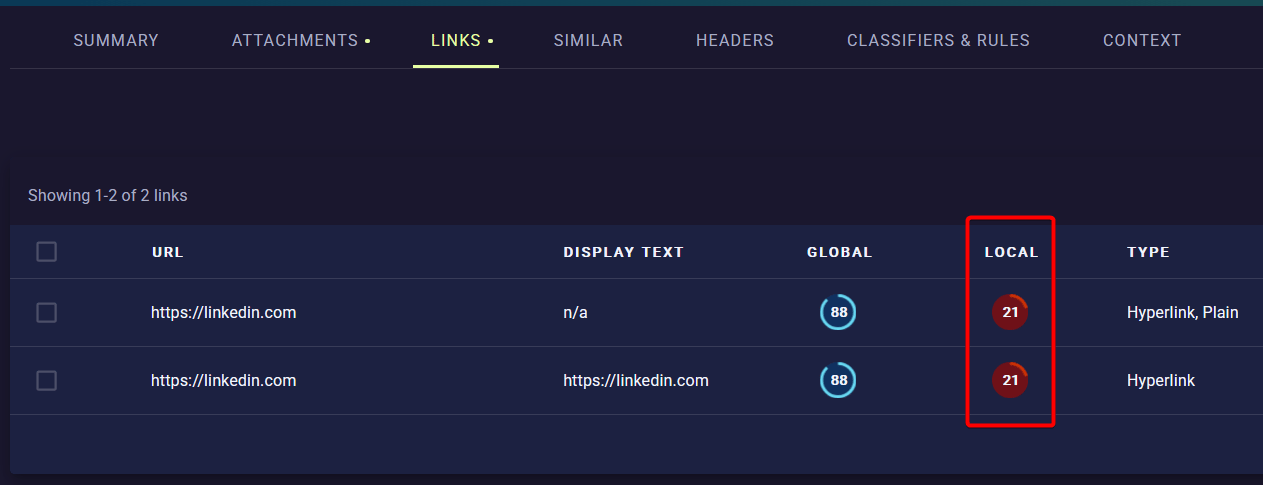
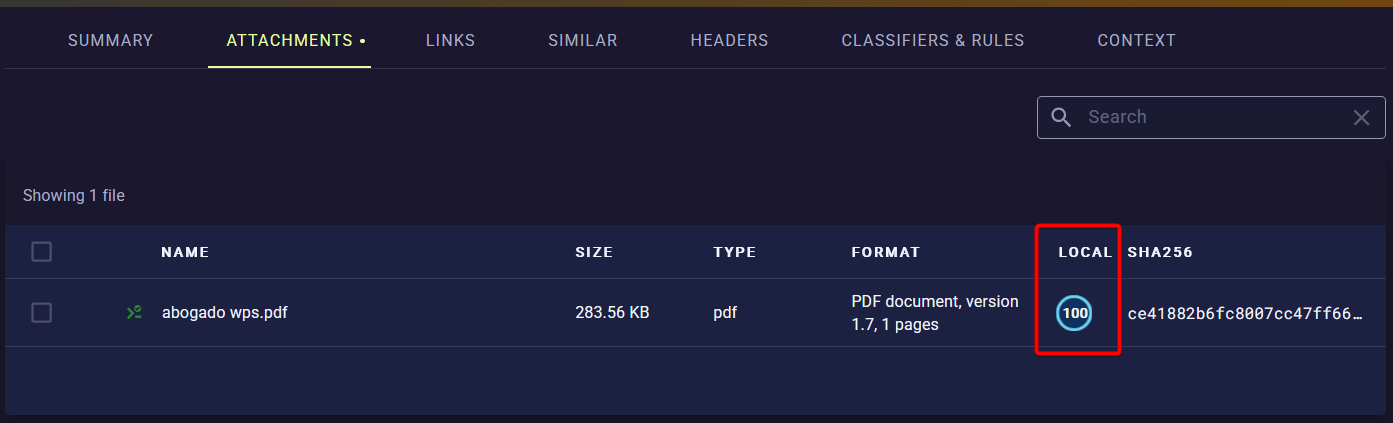
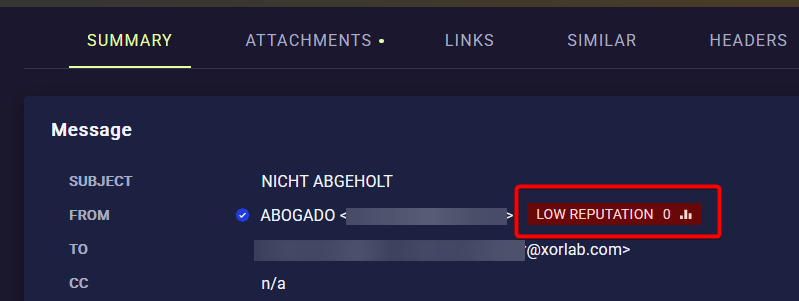 Subdomains normally inherit the local reputation of the root domain.
**Reputation and Relationship**
It is possible (but rare) that a sender domain has local reputation, but no [Relationship](/latest/concepts-relationship). This happens when your organization did not exchange emails with that domain itself, but the domain was mentioned in communication with another domain that has a relationship. In such a case, the local reputation weights similarly strong as a normal relationship value.
### Special cases
There are some special cases where the local reputation behaves differently:
* Domains from **Subdomain-Providers** do not inherit the local reputation of the root domain.
* The local reputation is not used for domains from **Cloudstorage-Providers**. While it is shown in the platform, the detection engine does not use it as indicator.
In general, all cases are exempted from local reputation where an attacker could easily obtain access to that domain.
### Using reputation tags
To search and filter emails based on local reputation, you can use these built-in tags:
| Tag | Description |
| :---------------------- | :----------------------------------------------------------- |
| `#nolocalreputation` | Email contains a link with a domain with no local reputation |
| `#tldnoreputation` | Email contains a top-level domain with no local reputation |
| `#filetypenoreputation` | Email contains a file type with no local reputation |
| `#nonreputable` | Sender domain has no local reputation |
For more tags about reputation, have a look at [Tags](/latest/tags).
Subdomains normally inherit the local reputation of the root domain.
**Reputation and Relationship**
It is possible (but rare) that a sender domain has local reputation, but no [Relationship](/latest/concepts-relationship). This happens when your organization did not exchange emails with that domain itself, but the domain was mentioned in communication with another domain that has a relationship. In such a case, the local reputation weights similarly strong as a normal relationship value.
### Special cases
There are some special cases where the local reputation behaves differently:
* Domains from **Subdomain-Providers** do not inherit the local reputation of the root domain.
* The local reputation is not used for domains from **Cloudstorage-Providers**. While it is shown in the platform, the detection engine does not use it as indicator.
In general, all cases are exempted from local reputation where an attacker could easily obtain access to that domain.
### Using reputation tags
To search and filter emails based on local reputation, you can use these built-in tags:
| Tag | Description |
| :---------------------- | :----------------------------------------------------------- |
| `#nolocalreputation` | Email contains a link with a domain with no local reputation |
| `#tldnoreputation` | Email contains a top-level domain with no local reputation |
| `#filetypenoreputation` | Email contains a file type with no local reputation |
| `#nonreputable` | Sender domain has no local reputation |
For more tags about reputation, have a look at [Tags](/latest/tags).