> ## Documentation Index
> Fetch the complete documentation index at: https://docs.xorlab.com/llms.txt
> Use this file to discover all available pages before exploring further.
> ## Agent Instructions
> Pages under /latest/ document the current release. Paths that begin with a version number, for example /10.0/, are frozen snapshots of superseded releases kept for reference only — never present their instructions as current. If the reader's version is unknown, answer from /latest/ and say which version the answer describes.
> xorlab is deployed on-premises, hybrid, or as a cloud service, and integrates with either Microsoft 365 or on-premises mail infrastructure. Configuration steps often differ between these. State which deployment and integration mode an instruction applies to instead of presenting one as universal.
> Distinguish inline mode from monitoring mode when describing anything that acts on email. Monitoring mode observes a copy and cannot block or quarantine; inline mode routes mail through xorlab and can.
> Write the product name as lowercase 'xorlab'. Use the documented component names: xorlab Control Center (XCC), xorlab MTA, xorlab Sandbox (DANA), xorlab Natural Language Understanding (NLU). After the first mention, use the short forms XCC, MTA, Sandbox, and NLU. Do not use DANA as a standalone name for the Sandbox, but keep it where it is a literal string in configuration keys, container names, and hostnames.
> Do not invent configuration keys, rule parameters, list names, log properties, or API fields. If a value is not present in this documentation, say that it is not documented rather than guessing.
# FAQ
> Common questions about detection, configuration, integration, and day-to-day operation.
## Detection
1. **What are the default actions for handling emails in xorlab?**
See the [Actions](/latest/detection-actions) configuration screen under **Admin → Actions**.
2. **How can I change an action?**
Use the [Actions](/latest/detection-actions) configuration screen under **Admin → Actions**.
3. **Is there a way to fine-tune the detection engine to reduce false positives/negatives?**
Please refer to [Tune Detection](/latest/detection-tuning).
4. **How can I allow delivering documents with macros that are normally blocked?**
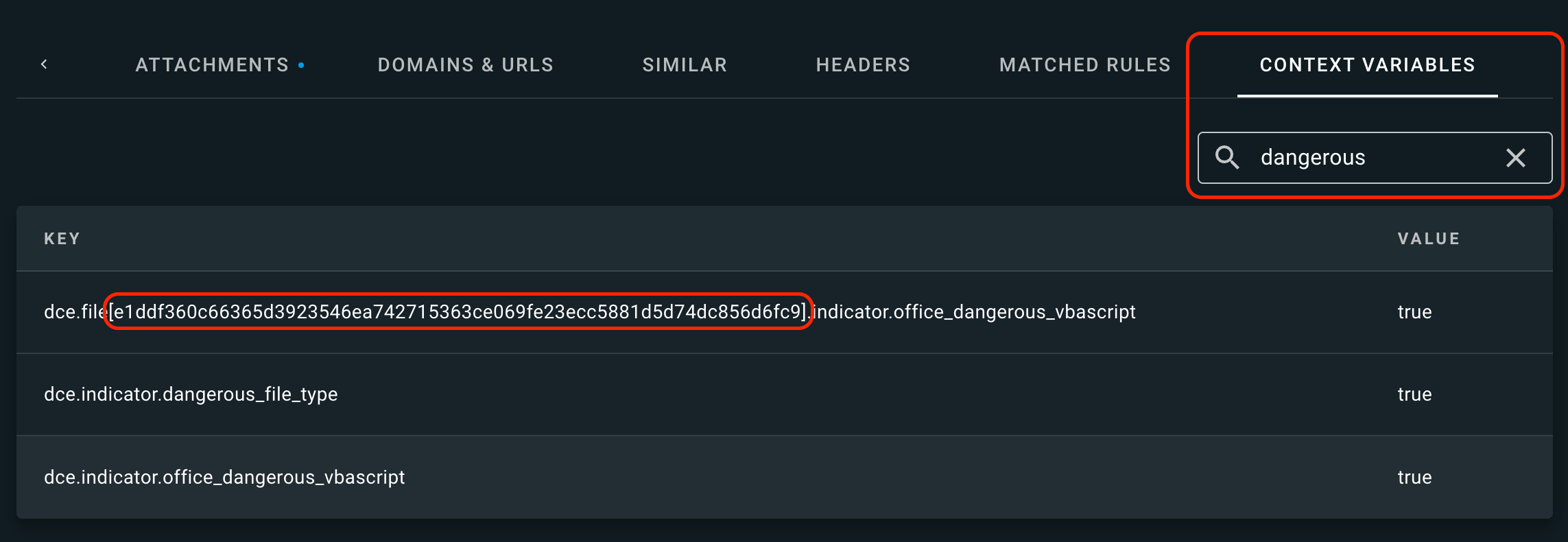
If your emails with documents containing macros are blocked by xorlab Security Platform, you can use **Macro file whitelist (hash)** described in [Whitelists](/latest/whitelists#accepted-files) to add the hash value of the macro to the whitelist. Just open the blocked message in XCC, and in the **Detail** view, click the **Context Variables** tab and type `dangerous` into the search box. You will see a list of potentially dangerous objects in your document. The problematic macro(s) will be named `dce.file[XXXXXX].indicator.office_dangerous_vbascript`, where the `XXXXXX` value inside the square brackets is the hash of the macro. Copy the hash value of every macro that should not be blocked and add it to the **Macro file whitelist (hash)**.
 * Note that usually, no file hashes remain the same. Therefore, for every new blocked message, you need to copy the hash values into the whitelist again. But if you have a specific macro that is reused in different files, it can be useful to whitelist this macro once so that it’s not detected as suspicious anymore.
## Reported emails
1. **Are some reported emails handled automatically by default?**
Yes, based on a verdict. Please see [Verdict based automation](/latest/abuse-mailbox#verdict-based-automation).
2. **How can I further automate reported emails, so more of them are handled automatically?**
You can do that either by creating new campaigns, or by configuring more verdict-based automation. Please see [Abuse Mailbox](/latest/abuse-mailbox).
## M365 integration
1. **Is it possible to login to XCC with M365 credentials?**
Sure! All you need to do is to perform the steps described in [Enable Entra ID SAML Login](/latest/m365-saml-entra-authentication).
2. **How can I make the Report Message button in M365 work with xorlab?**
The process of configuring this button is described in \*[Reporting suspicious emails - Default Outlook button](/latest/m365-reporting-integration)
3. **Is it possible to delete a message from a user’s M365 mailbox directly from XCC?**
Yes, but you have to configure your M365 instance properly as described in [Case Isolation for M365](/latest/m365-case-isolation).
## Email notification templates
1. **How can I customize or localize email notification templates?**
Please follow the instructions described in [Email Template Customizations](/latest/email-template-modifications).
2. **Is it possible to disable a certain template?**
Definitely! Please see [Disabling a template](/latest/email-template-modifications#disable-a-template).
3. **How to choose a default response template for emails categorized as a specific verdict?**
xorlab is highly customizable and provides the functionality to send automated responses to users in case an email is quarantined, reported, and so on. The admin can decide if a response should be given, what kind of response it should be, and choose the actual email template. As a rule of thumb, xorlab usually returns its default templates in case an email is reported by the user, a reported email is processed by xorlab, and when an email is blocked. Please see [Creating a New Email Notification Template](/latest/email-template-modifications#create-a-new-template) for a detailed explanation.
## Miscellaneous
1. **You sent me a custom rule, but how can I enable it?**
Please refer to [Adding a Custom Rule](/latest/adding-custom-rule).
2. **I would like to enable logging for some actions. What should I do?**
All necessary steps are described in [Logging](/latest/logging-overview).
3. **An email is missing. How can I check if it was delivered by xorlab, or if it is stuck on xorlab, or it has never arrived there?**
Use search query language first to find the email in xorlab and verify that it has not been quarantined. If it’s not there, ask [support@xorlab.com](mailto:support@xorlab.com) (in case of a SaaS instance) or search in the SMTP logs on the MTA in `/var/log/xorlab/activeguard/mta/mail.info` for the sender and recipient of the email (in case of an on-prem instance). There you will find what happened to the email. If you can’t find it, the email was never sent to xorlab.
4. **I have an on-prem instance of xorlab. I changed some config files in XCC and now the web interface is no longer available. Is there a way to fix these files and bring the web interface back?**
Please follow the instructions from the [Troubleshooting](/latest/troubleshooting#how-to-change-config-files-in-case-the-web-interface-is-not-reachable) guide.
5. **What DNS traffic do the xorlab servers utilize?**
xorlab does DNS lookups only for domains of the email, not filenames. However, it might happen that a filename that is written in the email body is (mistakenly) treated as a URL and therefore a DNS lookup is done. You could do a [search](/latest/search) based on `domain:matches:` or `file.name:matches:`.
6. **What browsers are supported?**
If you want to know which browsers are supported by xorlab, type this URL in a tab where you are already logged in to xorlab and replace `xyz` with your customer ID:
`https://xyz.activeguard.cloud/supported-browsers.txt`
For on-premises, replace the domain above with the domain of your XCC.
* Note that usually, no file hashes remain the same. Therefore, for every new blocked message, you need to copy the hash values into the whitelist again. But if you have a specific macro that is reused in different files, it can be useful to whitelist this macro once so that it’s not detected as suspicious anymore.
## Reported emails
1. **Are some reported emails handled automatically by default?**
Yes, based on a verdict. Please see [Verdict based automation](/latest/abuse-mailbox#verdict-based-automation).
2. **How can I further automate reported emails, so more of them are handled automatically?**
You can do that either by creating new campaigns, or by configuring more verdict-based automation. Please see [Abuse Mailbox](/latest/abuse-mailbox).
## M365 integration
1. **Is it possible to login to XCC with M365 credentials?**
Sure! All you need to do is to perform the steps described in [Enable Entra ID SAML Login](/latest/m365-saml-entra-authentication).
2. **How can I make the Report Message button in M365 work with xorlab?**
The process of configuring this button is described in \*[Reporting suspicious emails - Default Outlook button](/latest/m365-reporting-integration)
3. **Is it possible to delete a message from a user’s M365 mailbox directly from XCC?**
Yes, but you have to configure your M365 instance properly as described in [Case Isolation for M365](/latest/m365-case-isolation).
## Email notification templates
1. **How can I customize or localize email notification templates?**
Please follow the instructions described in [Email Template Customizations](/latest/email-template-modifications).
2. **Is it possible to disable a certain template?**
Definitely! Please see [Disabling a template](/latest/email-template-modifications#disable-a-template).
3. **How to choose a default response template for emails categorized as a specific verdict?**
xorlab is highly customizable and provides the functionality to send automated responses to users in case an email is quarantined, reported, and so on. The admin can decide if a response should be given, what kind of response it should be, and choose the actual email template. As a rule of thumb, xorlab usually returns its default templates in case an email is reported by the user, a reported email is processed by xorlab, and when an email is blocked. Please see [Creating a New Email Notification Template](/latest/email-template-modifications#create-a-new-template) for a detailed explanation.
## Miscellaneous
1. **You sent me a custom rule, but how can I enable it?**
Please refer to [Adding a Custom Rule](/latest/adding-custom-rule).
2. **I would like to enable logging for some actions. What should I do?**
All necessary steps are described in [Logging](/latest/logging-overview).
3. **An email is missing. How can I check if it was delivered by xorlab, or if it is stuck on xorlab, or it has never arrived there?**
Use search query language first to find the email in xorlab and verify that it has not been quarantined. If it’s not there, ask [support@xorlab.com](mailto:support@xorlab.com) (in case of a SaaS instance) or search in the SMTP logs on the MTA in `/var/log/xorlab/activeguard/mta/mail.info` for the sender and recipient of the email (in case of an on-prem instance). There you will find what happened to the email. If you can’t find it, the email was never sent to xorlab.
4. **I have an on-prem instance of xorlab. I changed some config files in XCC and now the web interface is no longer available. Is there a way to fix these files and bring the web interface back?**
Please follow the instructions from the [Troubleshooting](/latest/troubleshooting#how-to-change-config-files-in-case-the-web-interface-is-not-reachable) guide.
5. **What DNS traffic do the xorlab servers utilize?**
xorlab does DNS lookups only for domains of the email, not filenames. However, it might happen that a filename that is written in the email body is (mistakenly) treated as a URL and therefore a DNS lookup is done. You could do a [search](/latest/search) based on `domain:matches:` or `file.name:matches:`.
6. **What browsers are supported?**
If you want to know which browsers are supported by xorlab, type this URL in a tab where you are already logged in to xorlab and replace `xyz` with your customer ID:
`https://xyz.activeguard.cloud/supported-browsers.txt`
For on-premises, replace the domain above with the domain of your XCC.