> ## Documentation Index
> Fetch the complete documentation index at: https://docs.xorlab.com/llms.txt
> Use this file to discover all available pages before exploring further.
> ## Agent Instructions
> Pages under /latest/ document the current release. Paths that begin with a version number, for example /10.0/, are frozen snapshots of superseded releases kept for reference only — never present their instructions as current. If the reader's version is unknown, answer from /latest/ and say which version the answer describes.
> xorlab is deployed on-premises, hybrid, or as a cloud service, and integrates with either Microsoft 365 or on-premises mail infrastructure. Configuration steps often differ between these. State which deployment and integration mode an instruction applies to instead of presenting one as universal.
> Distinguish inline mode from monitoring mode when describing anything that acts on email. Monitoring mode observes a copy and cannot block or quarantine; inline mode routes mail through xorlab and can.
> Write the product name as lowercase 'xorlab'. Use the documented component names: xorlab Control Center (XCC), xorlab MTA, xorlab Sandbox (DANA), xorlab Natural Language Understanding (NLU). After the first mention, use the short forms XCC, MTA, Sandbox, and NLU. Do not use DANA as a standalone name for the Sandbox, but keep it where it is a literal string in configuration keys, container names, and hostnames.
> Do not invent configuration keys, rule parameters, list names, log properties, or API fields. If a value is not present in this documentation, say that it is not documented rather than guessing.
# Network Guide
> The network connections required between xorlab components and external services, for firewall and proxy configuration.
## System architecture
xorlab consists of three different components:
* **xorlab XCC**: One VM that offers a complete view of all processed emails and stores all persistent data.
* **xorlab MTA**: Email processing node. Depending on the expected load, you can operate multiple redundant MTA VMs to distribute email traffic.
* **xorlab Sandbox (DANA)**: Analyzes email attachments in an isolated environment. By default it is integrated as cloud service. You can opt to run it locally, but it requires direct hardware access and cannot be virtualized.
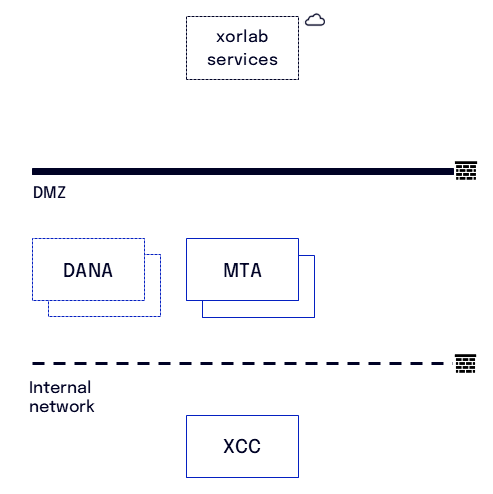 This diagram shows the standard locations of the components. The MTAs and Sandbox appliances can be placed in the DMZ and the XCC in the internal network.
## Required connections
**xorlab VMs to the Internet**
| Source | Destination | Protocol | Port | Description |
| :----- | :---------- | :------- | :------ | :-------------------------------------------------------------------------------------------------------------------------------------------------------------------------- |
| MTA | Internet | HTTPS | 443/TCP | Destinations: [xorlab services](#xorlab-services-destinations) |
| XCC | Internet | HTTPS | 443/TCP | Destinations: [xorlab services](#xorlab-services-destinations). Optional: [VirusTotal](#optional-virustotal), [Case Isolation](#optional-case-isolation-via-m365-graph-api) |
**Internal network to xorlab VMs**
| Source | Destination | Protocol | Port | Description |
| :--------------- | :---------- | :------- | :------- | :---------------------- |
| Internal network | MTA | SMTP | 25/TCP | Receive outgoing emails |
| Internal network | MTA | HTTPS | 8443/TCP | MTA GUI |
| Internal network | MTA | SSH | 22/TCP | SSH access |
| Internal network | XCC | HTTPS | 443/TCP | XCC web interface |
| Internal network | XCC | SSH | 22/TCP | SSH access |
**xorlab VMs to internal network**
| Source | Destination | Protocol | Port | Description |
| :----- | :--------------- | :------- | :------ | :----------------------------------------------------------------------- |
| MTA | Internal network | SYSLOG | 514/UDP | Logging (Security logs, Audit logs, etc.) to SIEM/SOAR |
| MTA | Internal network | SMTP | 25/TCP | Send incoming emails |
| MTA | Internal network | DNS | 53/UDP | Connect to internal DNS server - **external domain resolution required** |
| MTA | Internal network | NTP | 123/UDP | Time synchronization via NTP |
| XCC | Internal network | DNS | 53/UDP | Connect to internal DNS server |
| XCC | Internal network | SYSLOG | 514/UDP | Logging (Security logs, Audit logs, etc.) to SIEM/SOAR |
| XCC | Internal network | NTP | 123/UDP | Time synchronization via NTP |
**xorlab VMs to xorlab VMs**
| Source | Destination | Protocol | Port | Description |
| :----- | :---------- | :------- | :------- | :---------------------------------------------------------------- |
| MTA | XCC | HTTPS | 9080/TCP | Publish analysis results and retrieve configuration |
| MTA | XCC | Custom | 6379/TCP | Stores hashed text fragments to identify and group similar emails |
| MTA | XCC | HTTPS | 3100/TCP | Sending logs via Promtail for centralized monitoring |
| XCC | MTA | HTTPS | 9090/TCP | Collect Prometheus monitoring data from MTAs |
**ONLY with an on-premises Sandbox**
In the table below, the Sandbox host is listed as **DANA** — that is the hostname of the Sandbox appliance in on-premises deployments.
| Source | Destination | Protocol | Port | Description |
| :--------------- | :--------------- | :------- | :------- | :------------------------------------------------------------- |
| DANA | Internet | HTTPS | 443/TCP | Destinations: [xorlab services](#xorlab-services-destinations) |
| MTA | DANA | HTTPS | 8444/TCP | Sandbox analysis |
| XCC | DANA | HTTP | 9090/TCP | Collect Prometheus monitoring data from DANA |
| DANA | Internal network | NTP | 123/UDP | Time synchronization via NTP |
| DANA | Internal network | DNS | 53/UDP | Connect to internal DNS server |
| DANA | Internal network | SYSLOG | 514/UDP | Logging (Security logs, Audit logs, etc.) to SIEM/SOAR |
| Internal network | DANA | HTTPS | 8444/TCP | Technical management user interface for DANA |
| Internal network | DANA | SSH | 22/TCP | SSH access |
## xorlab services destinations
Below we list the external xorlab destinations that you need to allow for HTTPS. We provide both domains and IPs here:
* Allow based on **domains** when using a **proxy** for outgoing HTTPS requests
* Allow based on **IPs** when using only a **firewall**
It is enough to just allow the following two wildcard domains:
| Domain | Description |
| :----------------- | :----------------------- |
| `*.activeguard.io` | Used for xorlab services |
| `*.xorlab.com` | Used for product updates |
If you want to be more specific, you can allowlist the individual sub-domains instead.
The production IP addresses of these endpoints, for environments where outbound rules cannot be
expressed by domain, are documented in
[Deployment Defaults → Production endpoint addresses](/latest/deployment-defaults#production-endpoint-addresses).
Access to that page is restricted.
## **(Optional)** Case Isolation via M365 Graph API
If you have a hybrid setup where your mailboxes are already in M365, you can enable [Case Isolation](/latest/m365-case-isolation) to allow removing emails from mailboxes.
For this, the **XCC** must have access (proxy supported) to the following destinations:
* graph.microsoft.com
* login.microsoftonline.com
## **(Optional)** VirusTotal
xorlab supports VirusTotal integration to get additional threat intelligence for analysis purposes. If configured, **XCC** will query VirusTotal for every email which is opened in the web interface in the **Detail View**.
Note that the VirusTotal queries are done only on-demand whenever an analyst opens an email in the Detail View. There are no VirusTotal queries done for the automated email classification.
In order to issue VirusTotal queries, the **XCC** must have access (proxy supported) to the following destination:
* **virustotal**: virustotal.com on port 443/TCP
This diagram shows the standard locations of the components. The MTAs and Sandbox appliances can be placed in the DMZ and the XCC in the internal network.
## Required connections
**xorlab VMs to the Internet**
| Source | Destination | Protocol | Port | Description |
| :----- | :---------- | :------- | :------ | :-------------------------------------------------------------------------------------------------------------------------------------------------------------------------- |
| MTA | Internet | HTTPS | 443/TCP | Destinations: [xorlab services](#xorlab-services-destinations) |
| XCC | Internet | HTTPS | 443/TCP | Destinations: [xorlab services](#xorlab-services-destinations). Optional: [VirusTotal](#optional-virustotal), [Case Isolation](#optional-case-isolation-via-m365-graph-api) |
**Internal network to xorlab VMs**
| Source | Destination | Protocol | Port | Description |
| :--------------- | :---------- | :------- | :------- | :---------------------- |
| Internal network | MTA | SMTP | 25/TCP | Receive outgoing emails |
| Internal network | MTA | HTTPS | 8443/TCP | MTA GUI |
| Internal network | MTA | SSH | 22/TCP | SSH access |
| Internal network | XCC | HTTPS | 443/TCP | XCC web interface |
| Internal network | XCC | SSH | 22/TCP | SSH access |
**xorlab VMs to internal network**
| Source | Destination | Protocol | Port | Description |
| :----- | :--------------- | :------- | :------ | :----------------------------------------------------------------------- |
| MTA | Internal network | SYSLOG | 514/UDP | Logging (Security logs, Audit logs, etc.) to SIEM/SOAR |
| MTA | Internal network | SMTP | 25/TCP | Send incoming emails |
| MTA | Internal network | DNS | 53/UDP | Connect to internal DNS server - **external domain resolution required** |
| MTA | Internal network | NTP | 123/UDP | Time synchronization via NTP |
| XCC | Internal network | DNS | 53/UDP | Connect to internal DNS server |
| XCC | Internal network | SYSLOG | 514/UDP | Logging (Security logs, Audit logs, etc.) to SIEM/SOAR |
| XCC | Internal network | NTP | 123/UDP | Time synchronization via NTP |
**xorlab VMs to xorlab VMs**
| Source | Destination | Protocol | Port | Description |
| :----- | :---------- | :------- | :------- | :---------------------------------------------------------------- |
| MTA | XCC | HTTPS | 9080/TCP | Publish analysis results and retrieve configuration |
| MTA | XCC | Custom | 6379/TCP | Stores hashed text fragments to identify and group similar emails |
| MTA | XCC | HTTPS | 3100/TCP | Sending logs via Promtail for centralized monitoring |
| XCC | MTA | HTTPS | 9090/TCP | Collect Prometheus monitoring data from MTAs |
**ONLY with an on-premises Sandbox**
In the table below, the Sandbox host is listed as **DANA** — that is the hostname of the Sandbox appliance in on-premises deployments.
| Source | Destination | Protocol | Port | Description |
| :--------------- | :--------------- | :------- | :------- | :------------------------------------------------------------- |
| DANA | Internet | HTTPS | 443/TCP | Destinations: [xorlab services](#xorlab-services-destinations) |
| MTA | DANA | HTTPS | 8444/TCP | Sandbox analysis |
| XCC | DANA | HTTP | 9090/TCP | Collect Prometheus monitoring data from DANA |
| DANA | Internal network | NTP | 123/UDP | Time synchronization via NTP |
| DANA | Internal network | DNS | 53/UDP | Connect to internal DNS server |
| DANA | Internal network | SYSLOG | 514/UDP | Logging (Security logs, Audit logs, etc.) to SIEM/SOAR |
| Internal network | DANA | HTTPS | 8444/TCP | Technical management user interface for DANA |
| Internal network | DANA | SSH | 22/TCP | SSH access |
## xorlab services destinations
Below we list the external xorlab destinations that you need to allow for HTTPS. We provide both domains and IPs here:
* Allow based on **domains** when using a **proxy** for outgoing HTTPS requests
* Allow based on **IPs** when using only a **firewall**
It is enough to just allow the following two wildcard domains:
| Domain | Description |
| :----------------- | :----------------------- |
| `*.activeguard.io` | Used for xorlab services |
| `*.xorlab.com` | Used for product updates |
If you want to be more specific, you can allowlist the individual sub-domains instead.
The production IP addresses of these endpoints, for environments where outbound rules cannot be
expressed by domain, are documented in
[Deployment Defaults → Production endpoint addresses](/latest/deployment-defaults#production-endpoint-addresses).
Access to that page is restricted.
## **(Optional)** Case Isolation via M365 Graph API
If you have a hybrid setup where your mailboxes are already in M365, you can enable [Case Isolation](/latest/m365-case-isolation) to allow removing emails from mailboxes.
For this, the **XCC** must have access (proxy supported) to the following destinations:
* graph.microsoft.com
* login.microsoftonline.com
## **(Optional)** VirusTotal
xorlab supports VirusTotal integration to get additional threat intelligence for analysis purposes. If configured, **XCC** will query VirusTotal for every email which is opened in the web interface in the **Detail View**.
Note that the VirusTotal queries are done only on-demand whenever an analyst opens an email in the Detail View. There are no VirusTotal queries done for the automated email classification.
In order to issue VirusTotal queries, the **XCC** must have access (proxy supported) to the following destination:
* **virustotal**: virustotal.com on port 443/TCP