> ## Documentation Index
> Fetch the complete documentation index at: https://docs.xorlab.com/llms.txt
> Use this file to discover all available pages before exploring further.
> ## Agent Instructions
> Pages under /latest/ document the current release. Paths that begin with a version number, for example /10.0/, are frozen snapshots of superseded releases kept for reference only — never present their instructions as current. If the reader's version is unknown, answer from /latest/ and say which version the answer describes.
> xorlab is deployed on-premises, hybrid, or as a cloud service, and integrates with either Microsoft 365 or on-premises mail infrastructure. Configuration steps often differ between these. State which deployment and integration mode an instruction applies to instead of presenting one as universal.
> Distinguish inline mode from monitoring mode when describing anything that acts on email. Monitoring mode observes a copy and cannot block or quarantine; inline mode routes mail through xorlab and can.
> Write the product name as lowercase 'xorlab'. Use the documented component names: xorlab Control Center (XCC), xorlab MTA, xorlab Sandbox (DANA), xorlab Natural Language Understanding (NLU). After the first mention, use the short forms XCC, MTA, Sandbox, and NLU. Do not use DANA as a standalone name for the Sandbox, but keep it where it is a literal string in configuration keys, container names, and hostnames.
> Do not invent configuration keys, rule parameters, list names, log properties, or API fields. If a value is not present in this documentation, say that it is not documented rather than guessing.
# On-prem Overview
> The complete ordered step list for integrating xorlab with on-premises email infrastructure.
**Prerequisites**
* Complete [Before You Begin](/latest/before-begin-integration)
Your MX records only change if xorlab replaces your existing gateway. See [Review What Changes in Your Environment](/latest/integration-impact#on-premises) for what each topology changes in your mail flow, what stays untouched and how to undo it.
| Step | Description |
| :-------------------------------------------------------------------- | :------------------------------------------------------------------------------------------------------------------------------------------------------------------------------------------------------------------------------------------------------------------------------------------------------------------------------------------------------------------------------------------------------------------------------------------------------------------------------------------------------------------------------------------------------------------------------------------------------------------------------------------------------------------------------------------------------------------------------------- |
| [Set Up Email Routing in xorlab](/latest/on-prem-smtp) | **Mandatory**. Configure xorlab to accept and forward emails properly in your environment. |
| Forward emails in **Monitoring** or **Inline** mode | **Mandatory**. In Monitoring mode, you send just copies of emails to xorlab. In Inline mode, you route emails via xorlab for active protection. See [Before you begin](/latest/before-begin-integration#choose-between-inline-and-monitoring-mode) and below for more information. Here we provide instructions for common systems.
*Monitoring*: [Cisco ESA](/latest/on-prem-esa-monitoring-mode) or [Exchange](/latest/on-prem-exchange-monitoring-mode)
*Inline*: [Exchange](/latest/on-prem-exchange-inline)
If your system is not listed—for example Cisco ESA in Inline mode, or any other MTA—contact [support@xorlab.com](mailto:support@xorlab.com) and we will guide you through the setup. |
| [Add Your Trusted Infrastructure](/latest/on-prem-add-trusted-mtas) | **Mandatory**. Configure your trusted email infrastructure in xorlab to allow proper detection. |
| [Enable SAML or LDAP Login](/latest/on-prem-saml-ldap-authentication) | **Optional**. Allow SAML-based or LDAP-based user login to xorlab. |
| [Integrate Reported Emails](/latest/on-prem-reporting-integration) | **Optional**. Integrate the Abuse Mailbox such that reported emails are handled by xorlab. |
## Inline mode diagrams
In Inline mode, xorlab filters all emails and sends the benign ones to the next hop. Depending on if xorlab is the gateway or an add-on, the integration looks different.
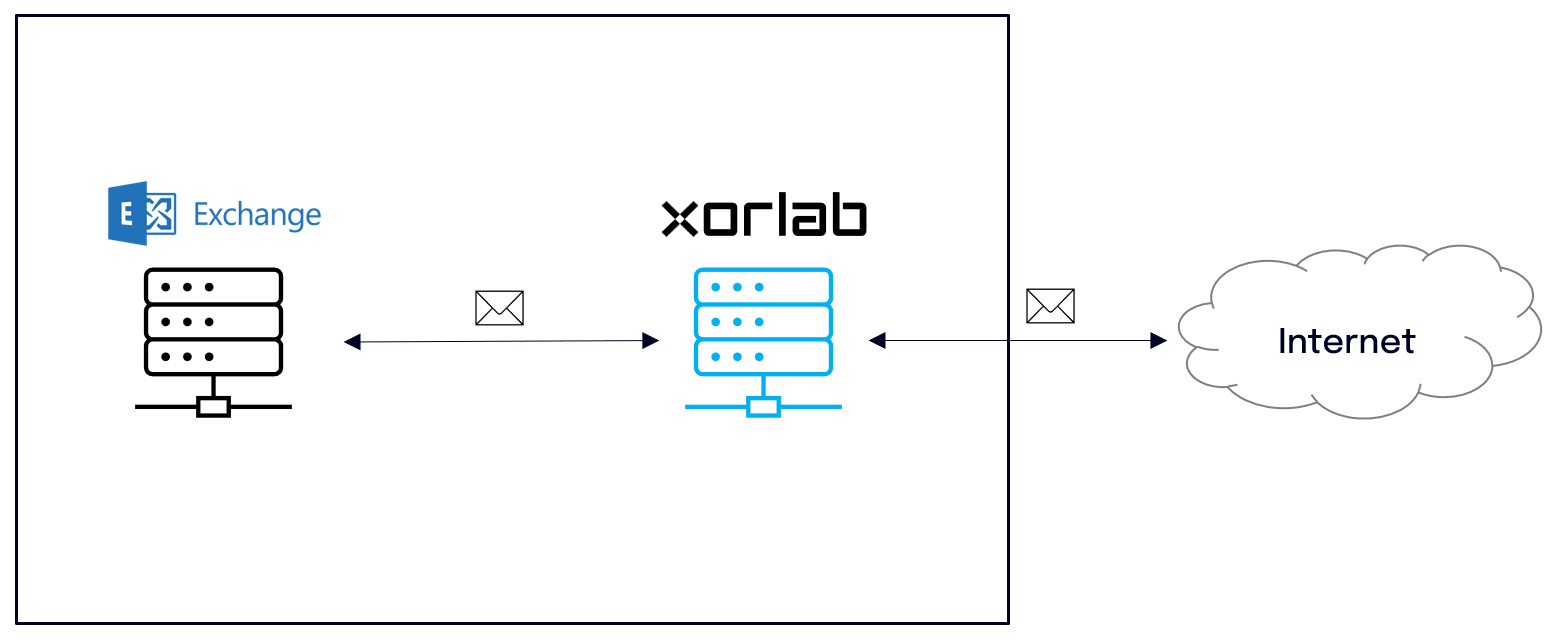 [Gateway setup guide](/latest/on-prem-smtp#configure-as-inline-gateway)
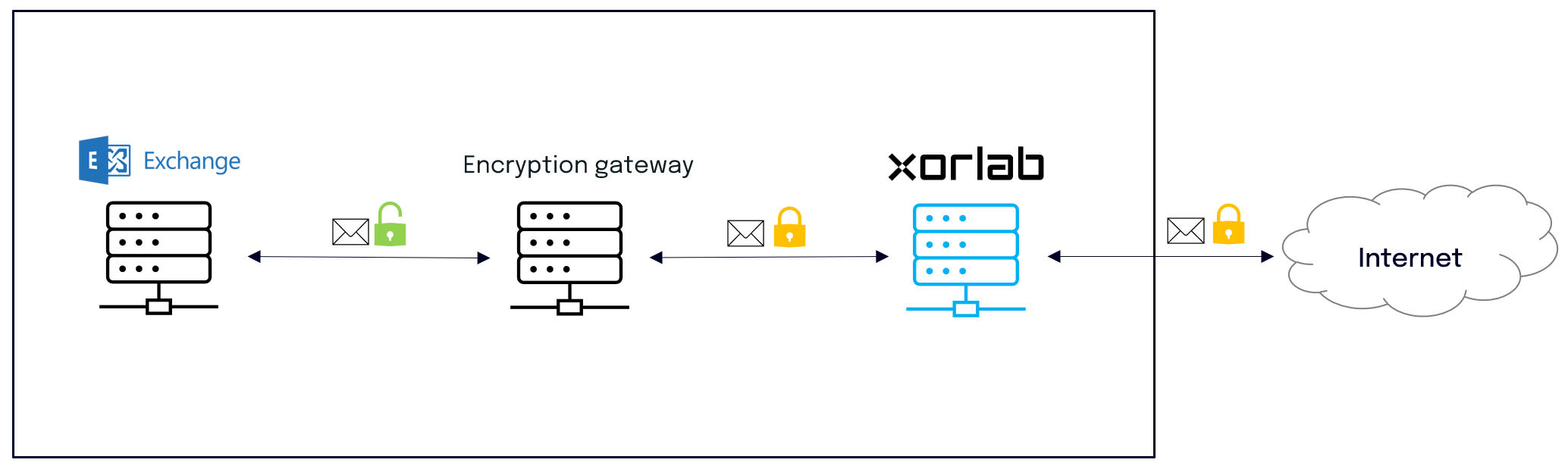 [Gateway setup guide](/latest/on-prem-smtp#configure-as-inline-gateway)
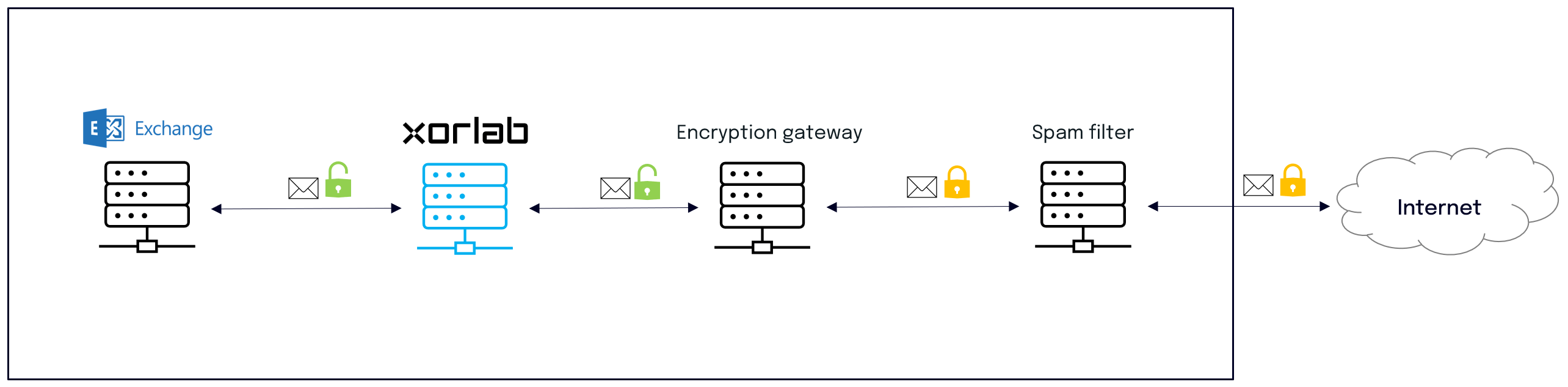 [Add-on setup guide](/latest/on-prem-smtp#configure-as-inline-add-on)
## Monitoring mode diagrams
In Monitoring mode, xorlab receives only a copy of every email and discards it after processing. The copy can be setup either on the gateway or on the Exchange server.
**Evaluation**
If you plan to evaluate xorlab as an add-on to an existing solution, setup the BCC on the Exchange server. In this way you can quickly evaluate the additional security that xorlab provides on top.
[Add-on setup guide](/latest/on-prem-smtp#configure-as-inline-add-on)
## Monitoring mode diagrams
In Monitoring mode, xorlab receives only a copy of every email and discards it after processing. The copy can be setup either on the gateway or on the Exchange server.
**Evaluation**
If you plan to evaluate xorlab as an add-on to an existing solution, setup the BCC on the Exchange server. In this way you can quickly evaluate the additional security that xorlab provides on top.
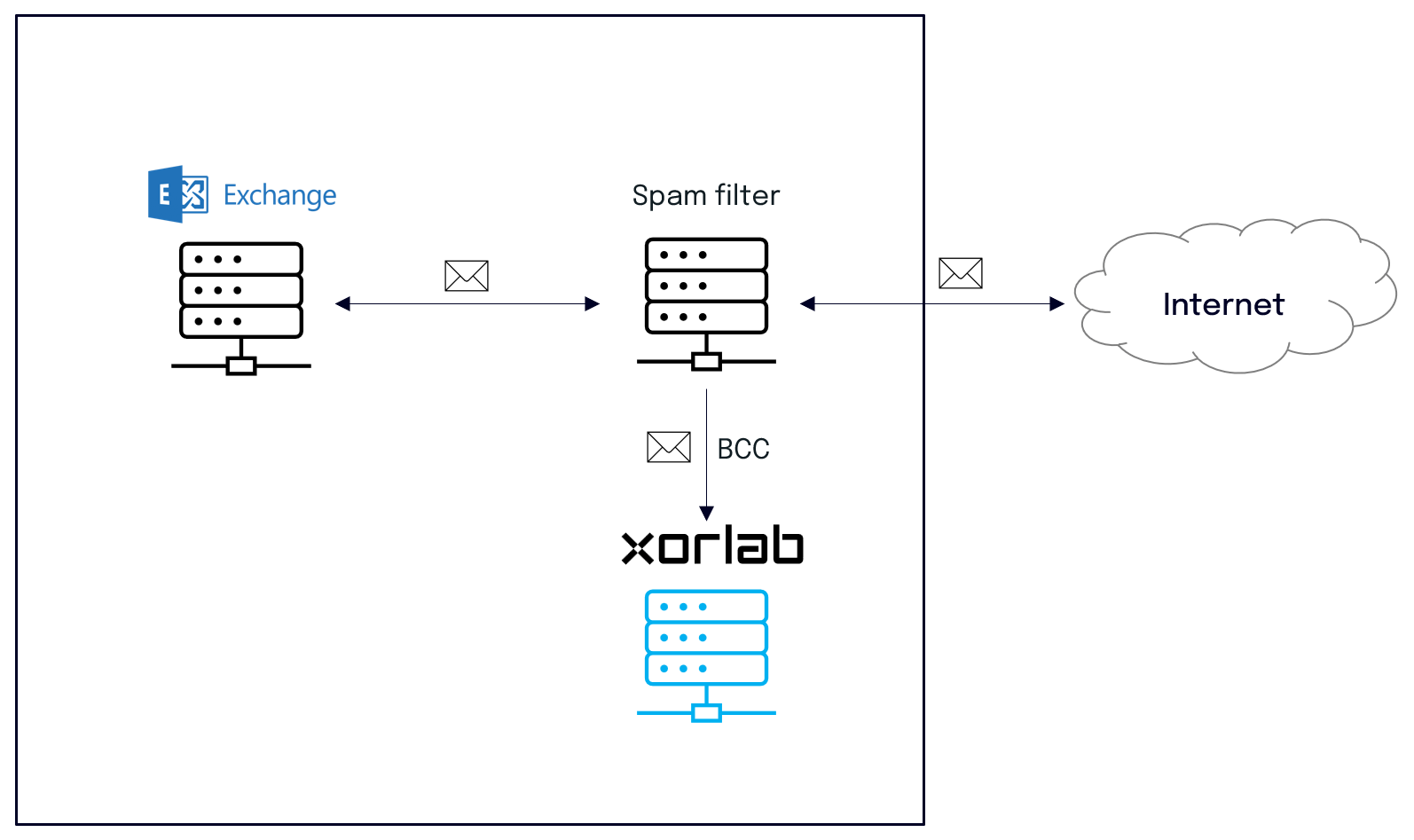 [Monitoring setup guide](/latest/on-prem-smtp#configure-for-monitoring)
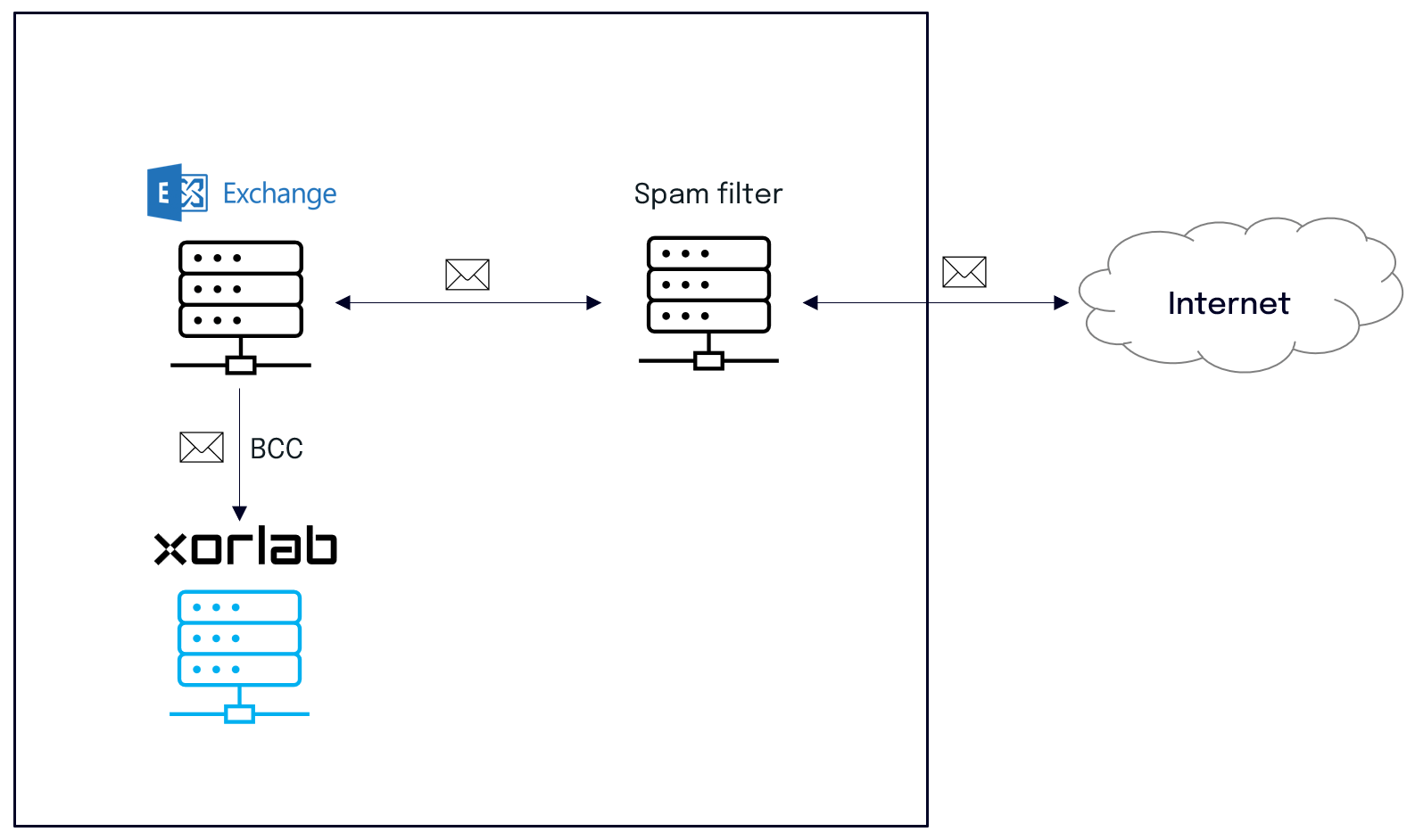 [Monitoring setup guide](/latest/on-prem-smtp#configure-for-monitoring)
The diagrams show Exchange and a generic gateway, but the interface is plain SMTP: any other MTA or secure email gateway can take the place of the gateway shown. See [Advanced SMTP Configurations](/latest/smtp-configuration) for multiple next hops, per-domain routing, and TLS enforcement.
## Multi-Tenancy
If you protect more than one organization with the same xorlab instance, follow [Add a Tenant](/latest/multi-tenancy-new-tenant) instead of the table above. It uses the same guides, but adds the per-tenant configuration around them:
* Configure the domains and routing of the tenant with the topology that matches your setup, see [Configure Tenant Domains and Routing](/latest/multi-tenancy-domain-and-routing).
* Set up SAML or LDAP per tenant, see [Enable Tenant Login](/latest/multi-tenancy-authentication).
* Configure the trusted infrastructure per tenant or in a shared config template, see [Trusted MTAs In-Depth](/latest/trusted-mtas).
* Assign reported emails to the right tenant, see [Assign Reported Emails to Tenants](/latest/multi-tenancy-reported-emails).
[Monitoring setup guide](/latest/on-prem-smtp#configure-for-monitoring)
The diagrams show Exchange and a generic gateway, but the interface is plain SMTP: any other MTA or secure email gateway can take the place of the gateway shown. See [Advanced SMTP Configurations](/latest/smtp-configuration) for multiple next hops, per-domain routing, and TLS enforcement.
## Multi-Tenancy
If you protect more than one organization with the same xorlab instance, follow [Add a Tenant](/latest/multi-tenancy-new-tenant) instead of the table above. It uses the same guides, but adds the per-tenant configuration around them:
* Configure the domains and routing of the tenant with the topology that matches your setup, see [Configure Tenant Domains and Routing](/latest/multi-tenancy-domain-and-routing).
* Set up SAML or LDAP per tenant, see [Enable Tenant Login](/latest/multi-tenancy-authentication).
* Configure the trusted infrastructure per tenant or in a shared config template, see [Trusted MTAs In-Depth](/latest/trusted-mtas).
* Assign reported emails to the right tenant, see [Assign Reported Emails to Tenants](/latest/multi-tenancy-reported-emails).