> ## Documentation Index
> Fetch the complete documentation index at: https://docs.xorlab.com/llms.txt
> Use this file to discover all available pages before exploring further.
> ## Agent Instructions
> Pages under /latest/ document the current release. Paths that begin with a version number, for example /10.0/, are frozen snapshots of superseded releases kept for reference only — never present their instructions as current. If the reader's version is unknown, answer from /latest/ and say which version the answer describes.
> xorlab is deployed on-premises, hybrid, or as a cloud service, and integrates with either Microsoft 365 or on-premises mail infrastructure. Configuration steps often differ between these. State which deployment and integration mode an instruction applies to instead of presenting one as universal.
> Distinguish inline mode from monitoring mode when describing anything that acts on email. Monitoring mode observes a copy and cannot block or quarantine; inline mode routes mail through xorlab and can.
> Write the product name as lowercase 'xorlab'. Use the documented component names: xorlab Control Center (XCC), xorlab MTA, xorlab Sandbox (DANA), xorlab Natural Language Understanding (NLU). After the first mention, use the short forms XCC, MTA, Sandbox, and NLU. Do not use DANA as a standalone name for the Sandbox, but keep it where it is a literal string in configuration keys, container names, and hostnames.
> Do not invent configuration keys, rule parameters, list names, log properties, or API fields. If a value is not present in this documentation, say that it is not documented rather than guessing.
# Enable Release Requests
> Let end users request release of emails they cannot release themselves, for analyst review.
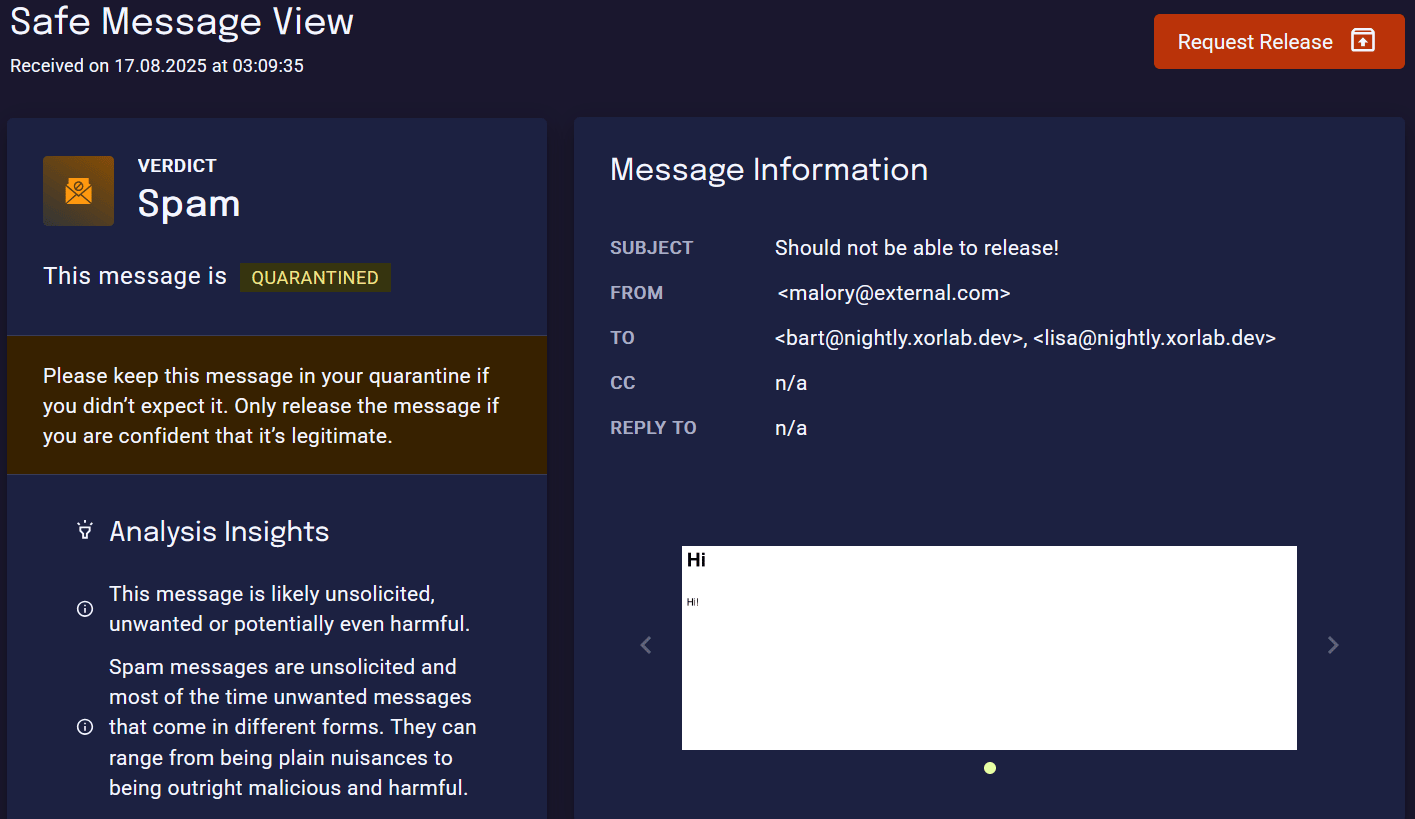
End-users request release from their Self-Service Quarantine (SSQ); analysts then decide whether to release or deny each request.
**Prerequisites**
* Complete [Set Up the SSQ](/latest/ssq-setup)
Follow the steps below to activate this feature:
1. In Expert Editor, open `shared/guarded_tenants.yml`.
2. Set `canRequestRelease: true` and `canRelease: false`for every quarantine where you want to enable the request release. See [List of Quarantines](/latest/ssq-list-of-quarantines).
```yaml {7,8} theme={null}
tenants:
- name: xorlab.com
quarantine:
quarantines:
- name: Phishing
canView: true
canRelease: false
canRequestRelease: true
```
The feature must be enabled **separately for each quarantine**. It only applies to quarantines where **end-users do not already have release permissions**.
3. Click **Publish**. The new configuration becomes active within about one minute. The SSQ will then show a **Request Release** button for emails in the corresponding quarantines.
 ## Enable request notifications
You can configure notifications to be triggered when specific release request events occur.
* `audit.quarantine.release.request.created` – A user has submitted a release request
* `audit.quarantine.release.request.approved` – An analyst has approved and released the email
* `audit.quarantine.release.request.denied` – An analyst has denied the release request
These notifications can be sent via Email or via Syslog:
* For **email notification**, you can find a working example here, in the `XCC` tab: [Enable Logging via Email](/latest/logging-via-email)
* Forward events to your **SIEM** using a [Enable Logging via Syslog](/latest/logging-via-syslog)
## Workflow
If you want to know more about the workflow from analyst and end-user perspective, have a look at [Handling Release Requests](/latest/handling-release-requests).
## Enable request notifications
You can configure notifications to be triggered when specific release request events occur.
* `audit.quarantine.release.request.created` – A user has submitted a release request
* `audit.quarantine.release.request.approved` – An analyst has approved and released the email
* `audit.quarantine.release.request.denied` – An analyst has denied the release request
These notifications can be sent via Email or via Syslog:
* For **email notification**, you can find a working example here, in the `XCC` tab: [Enable Logging via Email](/latest/logging-via-email)
* Forward events to your **SIEM** using a [Enable Logging via Syslog](/latest/logging-via-syslog)
## Workflow
If you want to know more about the workflow from analyst and end-user perspective, have a look at [Handling Release Requests](/latest/handling-release-requests).