Searching for topics
You can filter and search for emails based on detected topics using the topic attributes, as described in the Search Documentation.How it Helps
xorlab NLU enhances automated detection and threat analysis by providing additional context for security decisions. By understanding the meaning and intent behind email content, XSP can:- Increase detection accuracy: Helps distinguish between legitimate and suspicious emails by considering their topics in combination with other security signals.
- Improve prioritization: Automatically assigns higher risk scores to emails that match attack patterns, such as fraudulent invoices or fake account recovery requests.
- Reduce manual effort: Security teams don’t need to manually inspect emails for suspicious patterns—the platform detects and flags threats automatically.
- Enhance correlation with other indicators: Works alongside behavioral analysis and sender reputation checks to improve decision-making without analyst intervention.
Report misclassified topics
If you come across a misclassified topic, please report it — your feedback helps us continuously improve our product and its accuracy. To report a misclassified topic, follow these steps:- Enter the Message detail view of the email with the misclassified topic.
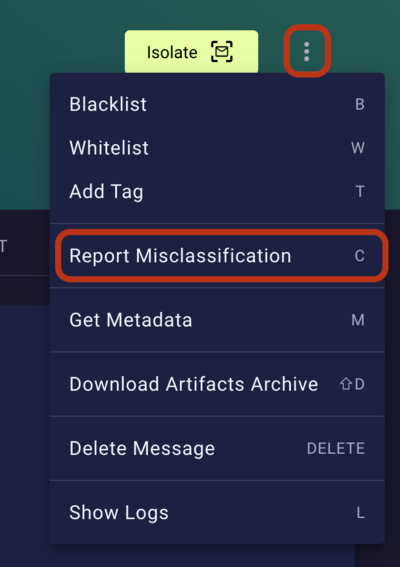
- Click the three-dot menu at the top right, then
Report Misclassification(also see Reporting Misclassification (False Positives/Negatives)).
- Keep the following default settings:
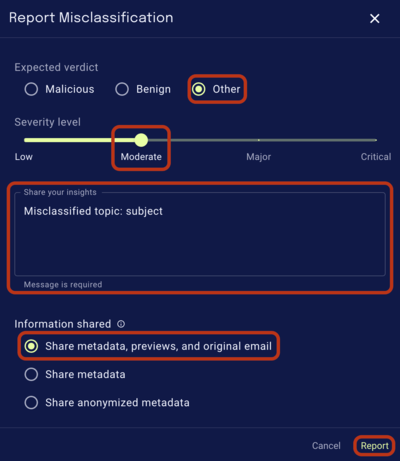
Expected verdictasOther.Severity levelasModerate.Information sharedasShare metadata, previews, and original email.
- Add a comment mentioning that it’s a misclassified topic, and where the misclassified text is found. E.g.
Misclassified topic: subject. - Click report.