

Configure built-in lists
To optimize protection, it is required to manually populate some of the built-in lists- Go to Admin and open Lists
-
Select VIP names and add the names of your C-level. These names will be used to detect VIP Fraud in incoming emails.
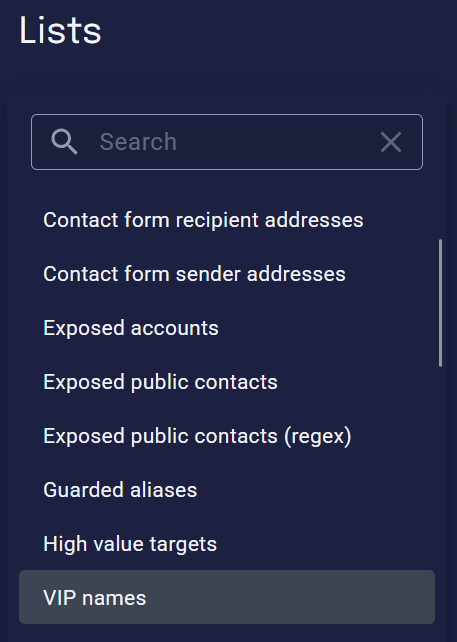
- Select High value targets and add the email addresses of recipients that will be likely targeted by advanced attacks. Usually this is C-level as well. They will receive a more strict and thorough filtering.
- Optional: Add mailboxes to Exposed accounts that should be filtered more aggressively. You can add mailboxes here that are publicly known and receive a lot of spam.
- Optional: Add mailboxes to Exposed public contacts that should be filtered less aggressively to avoid false positives.
Review default actions
Review what xorlab does with an email per verdict and confidence level, and adjust it where it does not match your policy: Review Default Actions.Activate additional detection features
The following detection related features can be activated to get the most out of xorlab:SSQ
Enable the Self-Service Quarantine (SSQ) for your end-users so that they can release harmless emails themselves.
Banners
Enable targeted contextual banners that will be added to suspicious emails.Note: Banners are a paid feature.
VirusTotal
Extend the XCC web interface with threat intelligence from Virustotal. This enhances the analyst experience, but does not affect detection.The VirusTotal license needs to be provided by the customer.
DNS Blocklists
To further improve spam detection, you can integrate third party DNS blocklists. This is only recommended when using xorlab as standalone filter. We recommend to use either:
- Spamhaus Integration
- Abusix - contact support@xorlab.com
Multi-Tenancy
In a multi-tenant deployment, the steps above are done per tenant:
Detection changes you make for a single tenant are stored in that tenant’s rule set. See Manage Tenant Rules for the underlying folder structure and for setting rule parameters per tenant.