

System architecture
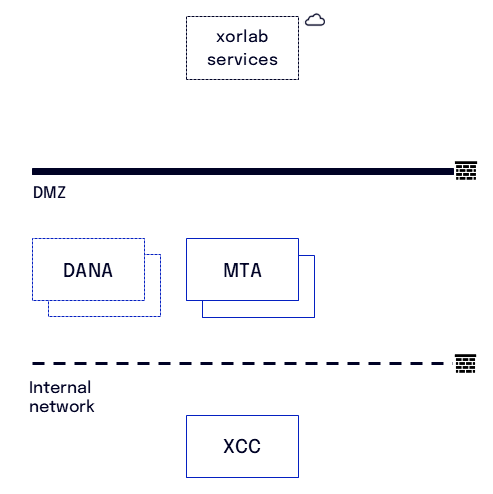
xorlab consists of three different components:- xorlab XCC: One VM that offers a complete view of all processed emails and stores all persistent data.
- xorlab MTA: Email processing node. Depending on the expected load, you can operate multiple redundant MTA VMs to distribute email traffic.
- xorlab Sandbox (DANA): Analyzes email attachments in an isolated environment. By default it is integrated as cloud service. You can opt to run it locally, but it requires direct hardware access and cannot be virtualized.
Required connections
xorlab VMs to the Internet
Internal network to xorlab VMs
xorlab VMs to internal network
xorlab VMs to xorlab VMs
ONLY with an on-premises Sandbox
In the table below, the Sandbox host is listed as DANA — that is the hostname of the Sandbox appliance in on-premises deployments.
xorlab services destinations
Below we list the external xorlab destinations that you need to allow for HTTPS. We provide both domains and IPs here:- Allow based on domains when using a proxy for outgoing HTTPS requests
- Allow based on IPs when using only a firewall
If you want to be more specific, you can allowlist the individual sub-domains instead.
The production IP addresses of these endpoints, for environments where outbound rules cannot be
expressed by domain, are documented in
Deployment Defaults → Production endpoint addresses.
Access to that page is restricted.
(Optional) Case Isolation via M365 Graph API
If you have a hybrid setup where your mailboxes are already in M365, you can enable Case Isolation to allow removing emails from mailboxes. For this, the XCC must have access (proxy supported) to the following destinations:- graph.microsoft.com
- login.microsoftonline.com
(Optional) VirusTotal
xorlab supports VirusTotal integration to get additional threat intelligence for analysis purposes. If configured, XCC will query VirusTotal for every email which is opened in the web interface in the Detail View. Note that the VirusTotal queries are done only on-demand whenever an analyst opens an email in the Detail View. There are no VirusTotal queries done for the automated email classification. In order to issue VirusTotal queries, the XCC must have access (proxy supported) to the following destination:- virustotal: virustotal.com on port 443/TCP