

xorlab Security Platform architecture
Every xorlab Security Platform component (Sandbox, MTA, and XCC) comprises a set of Docker containers which have different responsibilities. MTA and XCC components are delivered to on-prem customers as separate VMs. xorlab Cloud (xCloud) and the xorlab Sandbox are components in the SaaS infrastructure that are needed by our platform. In rare cases, the Sandbox is run on-prem. The following picture shows the most important containers, their dependencies, and a typical mail flow: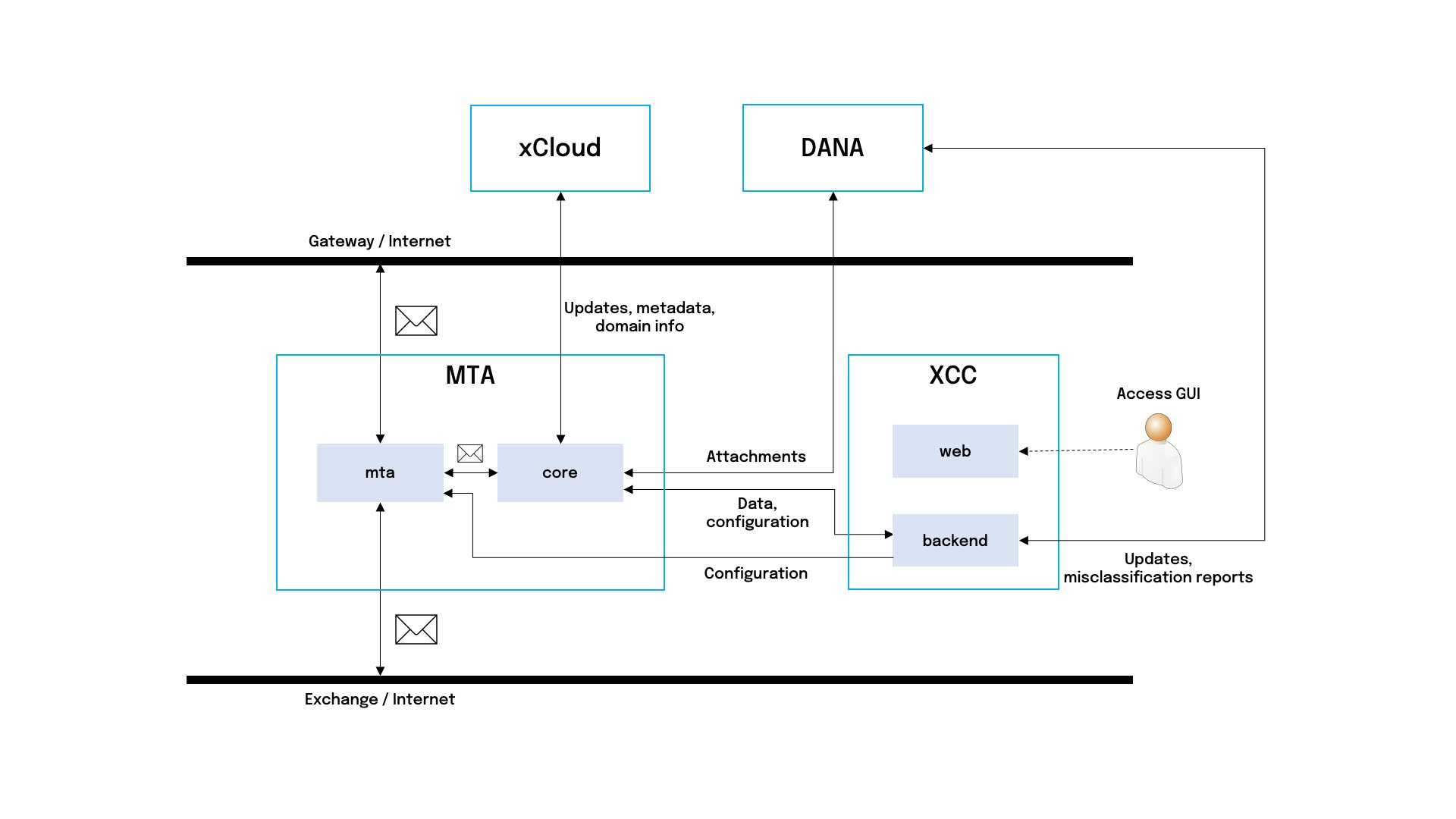
- An email arrives at the MTA (xorlab Mail Transfer Agent) component using SMTP and is received by the
mtacontainer (basically, a postfix mail server). - The
mtacontainer forwards the email—still using SMTP—to thecorecontainer. If this transmission fails—e.g., becausecoreis not ready to process the email—the email will be deferred by core, and you should see the following alert:Emails Older Than 100 Seconds Stuck In the Deferred Queue.corethen performs a static analysis of the message. Depending on the settings and the message itself, the message attachments can additionally be scanned by sending them to the xorlab Sandbox (DANA). When the Sandbox scan is done, the email will be shown in Messages → Pending in the web interface. - The analysis results are published to the XCC component, where the results are persisted in a database and accessible through the XCC web interface. If the result publishing fails, you will receive the following alert:
Core System Test Failed, with the description containing the name of the failing test—here,ResultPublishSystemTest. - If the message is allowed to be delivered, the
corecontainer hands it over back to themtacontainer for sending to the recipient. As in step #2, errors will trigger the following alert:Emails Older Than 100 Seconds Stuck In the Deferred Queue.
xcc_backend.
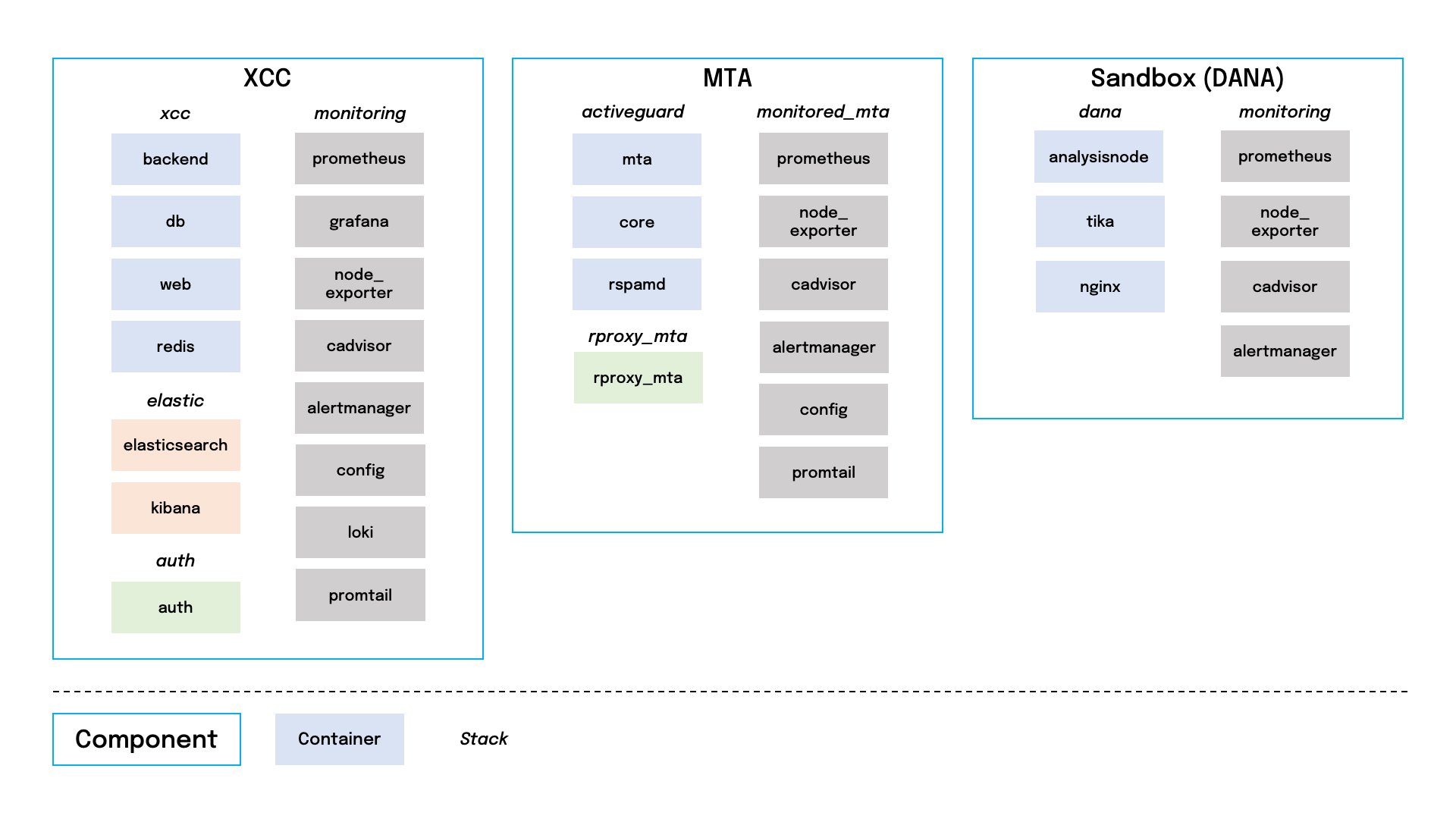
Container description
MTA
XCC
Sandbox (DANA)
Shared monitoring containers
Start and stop
Generic procedure to start and stop stacks on the xorlab Security Platform components is performed within the stack folder and looks like this.MTA
Stop and start:XCC
Stop and start:Sandbox (DANA)
Stop and start:Shell aliases
From release 11.0.5, each VM comes with shell aliases for the commands on this page. The upgrade installs them into/etc/profile.d/xorlab-aliases-<component>.sh, so they are available in every new SSH session after the upgrade. Only the aliases for the stacks present on the VM are installed. Run alias to list the ones on the VM you are logged in to.
Generic Docker Compose aliases
These are available on every component and act on the stack folder you are in, e.g.,/etc/xorlab/xcc.
MTA
XCC
The-all aliases stop and start the auth, xcc, and elastic stacks in the order given in Start and stop.
Sandbox (DANA)
Graceful MTA shutdown
The upgrade also installs themta-down command on the MTA. It finishes the emails the MTA has already accepted before it shuts down the activeguard stack:
- Blocks new incoming SMTP connections on port 25 of every physical network interface.
- Flushes the Postfix queues.
- Waits up to five minutes for the
corecontainer to finish processing, then up to one minute for it to publish the results to XCC. - Stops the activeguard stack and lifts the block again.
core container is not running, mta-down stops the stack right away. Use mta-down --block and mta-down --unblock to apply or lift only the SMTP block, as an alternative to the iptables commands in Stopping and resuming accepting emails by MTA.
Reboot
To reboot a component, execute the following command:- XCC: can be rebooted at any time.
-
MTA: stop the
agstack before reboot, preferably withmta-down.
Log files
Most xorlab Security Platform internal containers write log files to a standardized location:/var/log/xorlab/xcc/backend//var/log/xorlab/auth/auth//var/log/xorlab/activeguard/core//var/log/xorlab/dana/analysisnode/
- backend:
xcc.logandxcc_err.log - auth:
auth.logandauth_err.log - core:
activeguard.logandactiveguard_err.log - analysisnode:
analysisnode.logandanalysisnode_err.log
Standard outThe following containers do not have log files:
elasticsearch, kibana, db, and all monitoring containers. For those, logs are written to the standard output which you can read by executing docker compose logs <container> inside the /etc/xorlab/<stack> folder.Email queue
The email queue sizes can be conveniently observed in the grafana monitoring dashboards. For more advanced email queue handling, connect to each MTA separately. List all queued emails:Requeue vs. flushA flush is a lightweight operation where xorlab Security Platform will try to resend all queued emails.
A requeue will treat all queued emails as if they were completely new emails. This will re-apply all header checks, address rewrites, routing decisions, etc. If you use this when there are emails in the deferred queue that already passed through core, they will be sent again to core (which will cause the email to be shown twice in the XCC).
Exporting an email from the queue to EML format
The email files of a particular queue—active, incoming, or deferred—are in the /var/lib/docker/volumes/activeguard_mta_spool/_data/<queue_name> directory on the MTAs. You must be root to access this folder (sudo su).
The email file in the queue directory will have the queue ID as a name (e.g., 9A2821FE2). If you want to convert the email file to the EML format, you can use the following instructions:
-
Run
-
Execute
- Find the email file.
-
Run
- Press Ctrl+D.
-
Now, you can find the EML file in the
/var/log/xorlab/activeguard/mta/directory.
Stopping and resuming accepting emails by MTA
Sometimes you might want to prevent an MTA from accepting emails because, for example, you would like to empty the MTA from messages before performing an update. In this case, use SSH and run the following command (port 25 is used here as an example):eth0 is the interface name, which can be found, for example, with ip -4 a.
When you execute the command, wait one minute—or check in XCC for emails being processed—then shut down xorlab Security Platform.
After the maintenance, you can resume accepting emails:
Docker packet filteringTo learn more, see the Packet filtering and firewalls and Match the original IP and ports for requests from the official Docker Engine documentation.