Using topics
You can filter and search for emails based on detected topics using the topic attributes, as described in the Search Documentation. Some examples for threat hunting:topic:accountissue AND #nonreputable: All emails that talk about account problems (like a password reset) sent from addresses that are not relevant to your organization.topic:packagedelivery AND #senderfirstcontact: All package delivery emails where xorlab sees the sender for the first time.
How it helps
By understanding the meaning and intent behind email content, xorlab can:- Increase detection accuracy: Helps distinguish between legitimate and suspicious emails by considering their topics in combination with other security signals.
- Improve prioritization: Automatically assigns higher risk scores to emails that match attack patterns, such as fraudulent invoices or fake account recovery requests.
- Reduce manual effort: Security teams don’t need to manually inspect emails for suspicious patterns—the platform detects and flags threats automatically.
- Enhance correlation with other indicators: Works alongside behavioral analysis and sender reputation checks to improve decision-making without analyst intervention.
Report misclassified topics
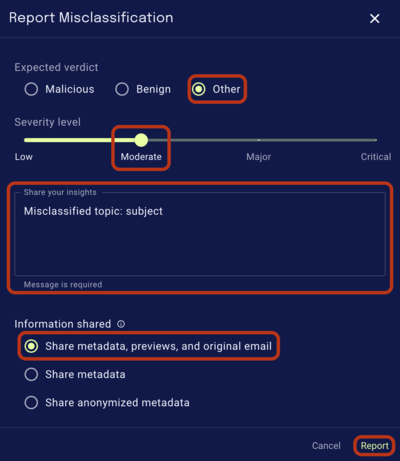
If you come across a misclassified topic, please report it — your feedback helps us continuously improve our product and its accuracy. To report a misclassified topic, follow these steps:- Report the email normally as described in Reporting a Misclassification.
-
Keep the default settings, but add a comment mentioning that it’s a misclassified topic, and where the misclassified text is found. E.g.
Misclassified topic: subject.