

Loggers
xorlab services produce log events and feed them into loggers. The logger name is the event name, so the Log Events reference reflects logger names you can configure: an event calledaudit.user.incident is fed into the logger audit.user.incident.
Loggers are organized in a hierarchy, with the ROOT logger at the top. A log event travels up the tree from its own logger, and every logger it passes hands it to whatever appenders are attached there.
Names are prefixes
Because the name is hierarchical, a shorter name catches more events.name="audit" logs every audit.* event, name="audit.user" only the user actions below it. The only valid prefixes are the ones you get by cutting the event name at a dot: name="aud" matches nothing.
Subscribing to audit and filtering in the SIEM is usually easier than listing every event name below it, as long as you can accept the volume.
Additivity controls duplicates
By default an event keeps traveling up to ROOT, so a logger onaudit and a second one on audit.user.incident both record an incident, twice. Set additivity="false" on the more specific logger to stop the event there:
additivity="false" is the usual cause of duplicate records in a SIEM.
Severity
Every event carries a fixed severity, listed in Log Events. It is not a threshold you configure: it travels with the event so your SIEM can prioritize on it.Appenders
An appender is the destination and the shape of the record: a Syslog server, an email, or a file, formatted as JSON, extended JSON, CEF, or a pattern you assemble yourself. The format is set by thepattern inside the appender — see Format Converters.
Three rules apply when you write the file:
- An appender must be declared before the logger that references it.
- One logger can reference several appenders, so the same event can go to a SIEM and to a local file at once.
- One appender can be referenced by several loggers, so a group of events can share a single destination.
Flow of an event
- A component produces an event, for example
audit.user.incident, and hands it to the logger of that name. - The event travels up the hierarchy.
- At each logger on the way, any attached appender records it.
- A logger with
additivity="false"stops the event there. - Otherwise it continues until it reaches ROOT.
One configuration file per component
The platform runs as a set of containers, and a container can only log the events it produces itself. So there is no single logging configuration: each component has its ownlogback-audit.xml, and the event you picked decides which one you edit. If you edit the wrong one, nothing is logged and no error is raised.
The Container column in Log Events maps to these directories:
Sandbox (Dana) logging is not published
/etc/xorlab/dana/default/ is not part of the Expert Editor, so it is edited over SSH and there is no Publish step. Restart the Sandbox stack instead, as described in Operation Reference.audit.user.lists.item_added, for example, is emitted by both Core and Backend, so configuring it in one directory records only that component’s occurrences.
The file
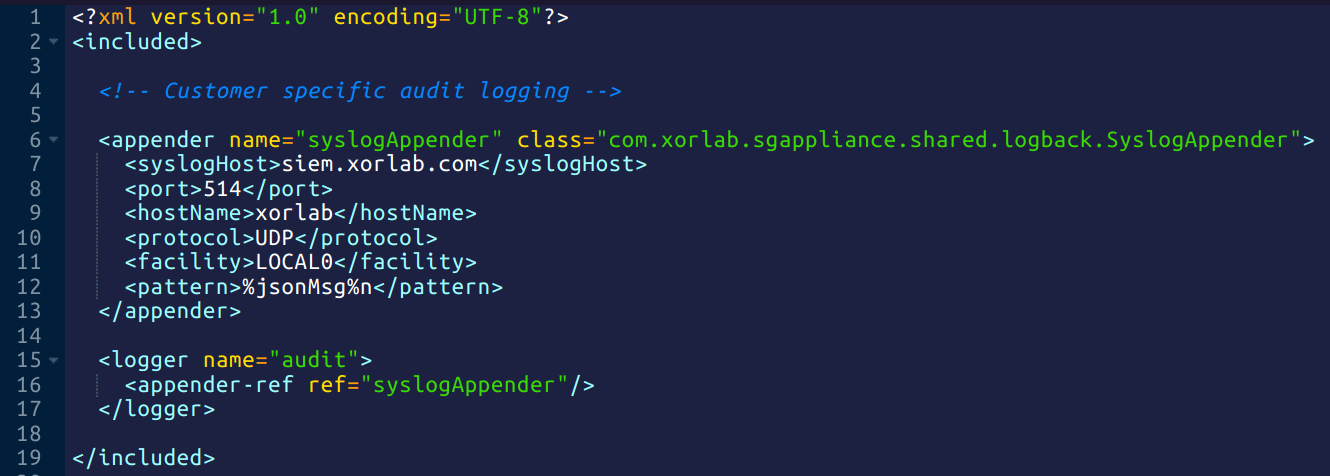
Eachlogback-audit.xml is an XML fragment that xorlab includes into the component’s own logging configuration, so the root element is <included> and not <configuration>:
logback-audit.xml